Chitika

Showing posts with label Samsung Smartphone Reviews. Show all posts

Friday, March 15, 2013

Samsung's gaming controller shows a heavy Xbox influence

samsung galaxy s4 gaming controller (engadget)

While there weren’t a lot of surprises at Samsung’s big Galaxy S4 unveiling today, one place the company never isappoints is in kooky accessories, and today was no exception. Engadget reports that the company was showing off its own Bluetooth gaming controller, complete with dual analog sticks, four face buttons, shoulder buttons, and a D-Pad. It looks pretty much exactly like an Xbox 360 controller, down to the colors of the face buttons, the positioning of the sticks, and the D-Pad design.

Maybe Samsung will have some better luck


The smartphone gaming controller space has filled out over the past year as more companies try to provide a console-like gaming experience on the go, but there still hasn’t been a breakout success story. Since this would be a first-party accessory, maybe Samsung will have some better luck — that is, if it can stave off those pesky design patent lawsuits. No word on pricing, but the controller should be headed to stores sometime this summer.

Get more from your phone with Samsung Grand's dual-SIM and Multi Window (hands-on)


BARCELONA, Spain--Announced in December 2012, the Samsung Galaxy Grand made an appearance at this year's Mobile World Congress amid a plethora of the company's new devices, like the Galaxy Young and Galaxy Fame. According to the company, the device will be available in both single- and dual-SIM versions. Unfortunately, no availability or pricing information has been released regarding the Grand.
Design
Like most Galaxy handsets, the Grand cuts a slim (0.38-inch to be exact) profile, is of a long rectangular shape with severely rounded corners, and has a wide home button at the bottom of the display.
Measuring 5.65 inches tall and nearly 3 inches wide, it has a spacious 5-inch LCD display that's responsive and bright. However, I did notice that colors like blue and green appeared more saturated than other hues.
The Grand features a thin chrome strip that borders all around its edges, and the phone's glossy plastic build keeps it lightweight.
Samsung Galaxy Grand
The Grand sports a thin chrome bordering and a 5-inch LCD screen.
As far as Galaxy devices go, the Grand doesn't break any molds in terms of design. Honestly, if it were to be mixed up in a bag with the Young and the Fame, I wouldn't know how to tell one from the next aside from screen size (though the Fame's bulbous home button could be a first clue).
Features
One interesting feature of the Grand is Multi Window, which lets you multitask with your apps through a little access arrow on the side of the screen.
Simply turn it on in the notifications bar and tap the arrow on the side of your screen. A row of common apps will crop up, such as the browser, your photo gallery, and Gmail. You can then access your current app and launch another one and view both at the same time.
Other features include the Android Jelly Bean 4.1.2 operating system, 8GB of internal memory, a microSD card slot that can hold up to 64GB of expandable memory, and Bluetooth 4.0. Currently, the handset's fastest data connectivity capability is HSPA+.
Hardware specs consist of a 1.2GHz dual-core processor and a 2,100mAh battery. On the back, you'll get an 8-megapixel camera capable of shooting 1080p video, and on the front is a 2-megapixel camera.
Outlook
If the Samsung Galaxy Grand smartphone were ever to come to the U.S., it'd be great to see 4G LTE capability. This would make it even more appealing on major carriers like AT&T and Verizon, which Galaxy handsets are no strangers to.
I do especially like the Multi Window feature. Many devices that sport huge screens these days lack any particular asset that takes full advantage of the real estate. At least with this software addition, users can get the most out of both their apps and the Grand's display.

Samsung Galaxy S4 keeps calm, carries on with big screen, 8-core chip and, yes, eye tracking

If you're looking for Samsung's new Galaxy S4 to define a novel new era of smartphone greatness, it's time to temper your expectations. The brand-new flagship smartphone, which runs the latest Android 4.2.2 Jelly Bean, improves hardware significantly and it piles on the features. Compared with the extremely successful Galaxy S3 that came before, it's a firm stride forward rather than a giant a leap, but it raises the bar again for Samsung's competitors. And by super-sizing the screen and packing in so much specialized software, the GS4 sets itself even farther apart from the iPhone.
The Galaxy S4 handset steadily draws from the same design language as the S3, but takes almost every spec to an extreme -- the screen is larger (5 inches), the resolution greater (1080p), the battery capacity higher (2,600mAh), the processor faster (1.9GHz quad-core or 1.6GHz octa-core), and the rear-facing camera stuffed with more megapixels (13, to be exact). But, once you've gone through the features checklist (which also includes lots of internal and external storage space and RAM), it's the software extras that Samsung continues to lean on to keep its phones one step ahead of the competition.
The problem is, based on my brief time with the Galaxy S4, very few of the extensive list of enhancements stood out as a killer, must-have, cannot-possibly-live-without feature. The TV control app that works with the IR blaster is perhaps one exception (the HTC One has this, too), as are a handy translation tool and eye-tracking and gesture capabilities that allow you to pause a video when you stop paying attention and let you hover your finger over an item to preview what it is. Many other software additions are semi-interesting ideas that some power users may enjoy once they've figured them out, but which will hardly convince a prospective buyer to pick the GS4 over, for instance, the HTC One, Nokia Lumia 920, or iPhone 5.

After using the device at a briefing (along with several other journalists), I do think that Samsung has accomplished what it's set out to do in pushing its Galaxy brand forward. Fans will find a familiar, appealing smartphone that's packed with hardware and software features -- albeit more than one person would ever use.
Design and build
At first glance, the Samsung Galaxy S4 looks like a cookie-cutter copy of the GS3, but larger. It has the same rounded edges and narrow physical home button as its predecessor, but at 7.9mm deep (0.31 inch) and 130g (4.6 ounces), it's also a little lighter and thinner. Part of the slim look and feel is a result of Samsung creating sharper, straighter lines with the phone than the GS3's subtle curves (the Galaxy line is apparently inspired by nature no more).
Samsung Galaxy S4
Samsung's new Galaxy S4 features a 5-inch 1080p HD screen and a slightly slimmer, lighter build than its antecedent.
Standing at 136.6mm tall by 68.9mm wide (5.4 inches by 2.7 inches), the Galaxy S4 fits right in between the GS3 and the Galaxy Note phones. It's large, to be sure -- very large -- but since I've grown used to holding big handsets, it didn't feel overwhelming in my hands. A more dimpled finish on the white version I held reminded me of the Galaxy S2, in contrast to the GS3's silky brushed feel. The GS4 also comes in "Black Mist."
While visually appealing, I've never seen a Samsung phone that wows me with its finely crafted build quality or materials. The GS4 doesn't reach the same caliber as the beautiful, all-metal HTC One, nor is it as polished as the iPhone 5. To be fair, that isn't Samsung's goal; after all, Samsung has stuck by plastic for a few good reasons, including durability (it won't smash like glass), manufacturing benefits, and price.
As the rumors and leaks foretold, the GS4 has a 5-inch HD Super AMOLED display with a 1,920x1,080-pixel screen resolution. While it isn't exactly edge-to-edge, the smaller bezel makes the screen feel more expansive. At full brightness, the display's 441ppi pixel density looked rich and crisp, but I'll need to compare it with the BlackBerry Z10, iPhone 5, and others to really get a lock on just how sharp it is. Also, like you'd find in Nokia's Lumia line, the GS4 uses a highly sensitive screen that lets you navigate with long fingernails or even gloves (a must for cold-weather climates.)
Above the display you'll find the usual array of sensors and the 2-megapixel front-facing camera lens. There's no front-facing flash on the GS4 as I would have liked, but that was mostly wishful thinking anyway. Below the screen, you'll find the solitary physical home button, flanked by capacitive menu and back buttons. On the top of the phone is where you'll find the IR blaster, which shoots out infrared light to control your TV directly from the handset.
What I really like about this blaster, other than the accompanying app, is that Samsung promises it works for all televisions, not just Samsung TVs. The app will let you control channels and volume, and also play on-demand content through a partner.
Samsung Galaxy S4
Beneath the back panel sits a 2,600mAh battery and a microSD card slot capable of up to 64GB in expandable storage.
On the back, there's the 13-megapixel camera, a jump up from the GS3's 8-megapixel lens. Even though the number of megapixels isn't everything, Samsung has had a good track record with images so far. The shooter has an LED flash and records 1080p HD video.
Beneath the back cover, you'll find a microSD card slot that can store up to 64GB in external memory, to go along with the 64GB internal storage. There's also a 2,600mAh battery.
OS and apps
The Galaxy S4 runs none other than Android 4.2.2 Jelly Bean, the most up-to-date version of Android you can get right now. Riding on top of it as usual is Samsung's Touch Wiz overlay, a customized interface that I, for one, think is getting a little long in the tooth. Also, keep in mind that the next Android OS, Key Lime Pie, should appear when Google I/O opens on May 15. That's not far away, so I hope that Samsung and the carriers fast-track the Galaxy S4 for an upgrade.
However, Samsung does use TouchWiz to add a bevy of software enhancements, like gestures, and a beefier notifications tray that offers a ton more toggling options to quickly turn settings on and off. In addition to your usual toggles for Wi-Fi, Bluetooth, and GPS, you'll also see toggles for call-blocking mode and eye-tracking gestures.
Samsung Galaxy S4
A tiny IR blaster on top turns your GS4 into a remote to control your TV.
To Samsung's credit, several functional tools carry over from the Galaxy Note 2, including the multiview mode that lets you split the screen to interact with two apps, say the browser and notes.
Once again attempting to out-Google Google, Samsung introduces the S Translator tool, embedding it into e-mail, the ChatOn messenger app, and letting it stand as its own tool. Speaking of ChatOn, the Samsung-built chat app adds three-way video calling, screen-sharing, and video calls that make use of both cameras.
I also like the idea of another new collaborative feature, Group Play. As with some of the GS3's photo-sharing features, this one rewards GS4 owners by letting them connect (via NFC or Bluetooth) to other Galaxy S4 devices to share music, photos, documents, and even engage in multiplayer games. For the music aspect, envision a whole room full of people playing the same song from their phones: instant surround sound!
As for Group Play games, Gun Bros 2 and Asphalt 7 have been specifically adapted for the GS4. Samsung will release an SDK for other game developers to jump on board with simultaneous, social game play. Good idea? Sure. But without knowing how practical it is to set up and use, the jury is still out.
Samsung Galaxy S4
The Galaxy S4 interface includes a more extensive set of toggle controls in the drop-down menu.
Although I didn't get a chance to try this next feature during my briefing, I like the idea of an integrated optical reader that can scan QR codes, turn business cards into text, and translate with S Translator. Nothing here is new to smartphones, and OCR (optical character recognition) doesn't always work, but it's good to see this sort of behavior brought to the surface.
Now, when Samsung spots a trend, it pounces. Thus the birth of S Health, a calorie-counter/pedometer in one that uses phone sensors like the accelerometer and barometer to track your steps, jogs, hops, jolts, snacks, and perspiration. Combined with one of its new Samsung-branded fitness wrist bands, Samsung is attempting to replace specialized third-party apps that do these functions already.
The problematic S Voice assistant and S Memo note apps are returning programs, along with settings that automatically adjust screen brightness based on the app you're in. Samsung presents this as a benefit to you, making reading or viewing more comfortable. In the GS3, a dimmer browser window threw me off, and made me think that the screen brightness was severely limited. I assume that, as with the GS3, the GS4 will let you adjust your preferences in various settings menus. The GS4 does the same for audio.
Samsung also announced a new feature for the S4 called Galaxy S Voice Drive. Designed for in-car use, the voice command feature will let drivers use the handset's built-in navigation system as well as make calls, send messages, and check the weather. I didn't have the opportunity to test the feature in a Manhattan hotel conference room, but Samsung says that Voice Drive will start when you get into your car.
Samsung Galaxy S4
Eye-tracking software keeps tabs on where you're looking.
Eye-tracking gestures
Conflicting rumors painted a scenario where you'd scroll the screen with your eyes using eye-tracking software within the GS4.
Turns out, that's somewhat true. Smart Pause and Smart Scroll are two features that build off the Galaxy S3's optional Smart Stay feature, which kept the screen from dimming when you looked at it. In the GS4, tilting the screen up or down while looking at it scrolls you up or down, say if you're reading a CNET story, of course. As a daily commuter with one hand on the phone and one on a hand strap, this could be a more convenient way to catch up with news while on the train or bus.
I really like the idea of Smart Pause, which halts a video you're watching when your eyes dart away, then resumes when you start paying attention again.
Both features worked better in theory than they did in practice, though I should mention that the GS4 I was looking at is (obviously) preproduction running prefinal software. Still, response time was a beat slower than I wanted, taking a little time to pause and resume the video, and scroll the screen. A minor delay makes sense. You wouldn't want to start and stop again every time you're distracted for a second. Instead, the software seems to track longer periods when you're away, like if you stop what you're doing to order a cup of coffee, talk to a friend, or climb a set of stairs.
Air View and gestures
While you can make googly eyes at the GS4, most gestures are still reserved for your fingertips. Hovering features known as Air View make their way from the stylus-centric Galaxy Note 2 andGalaxy Note 10.1 tablet to the Galaxy S4, but replace the stylus with your digit.
You can control the Galaxy S4 by waving your hand in front of the camera sensor.
Hover your finger and you can preview a video clip or image from the photo gallery, glance at browser tab thumbnails, find your place on a video timeline, and check out an e-mail. You'll also be able to magnify calendar events and get a closer look in speed dial. Flipboard has built a customized app to work with Air View, which lets you hover over a tile to see which articles lie beneath.
In addition to hovering with a fingertip, you can wave or wipe your whole hand in front of the screen (and camera sensor) to navigate around. For example, enable this gesture and you can agitate your palm to pick up the phone or switch songs in a playlist. Steadily sliding your hand back and forth can advance photos in a gallery, or browser tabs. You can also scroll up and down in a list.
The feature was a little jerky and jumpy when I tried it, but it did work. As with eye-tracking, you'll have to wait a half-second to see results.
Cameras and video
If the promise of the GS4's 13-megapixel images doesn't wow you, Samsung is hoping that its refreshed interface and enhanced features will. Perhaps the most out-there is the dual-shot mode, which takes photos and video from both the front- and rear-facing cameras, and combines them into one.
The background shows the capture from your main camera, while the foreground -- whatever you take from the front-facing camera -- lays on top. You can choose to change the window size and shape on top, say a postcard stamp, an oval, or a simple window. You can also swap camera positions so that rear-facing gives you the inset and the front-facing image forms the background. As to why, the answer, like some of Samsung's many features, is more correctly: why not?
The camera interface takes full advantage of the GS4's display.
Even more new modes include Sound & Shot, which takes a picture and captures up to 9 seconds of audio (sounds like HTC's Zoe mode to me), and Drama Shot, which combines all the actions from a burst shot into a single frame. If someone is jumping, for instance, you see all stages of the jump in one shot.
Then there's Cinema Photo, which lets you animate just one portion of a video and keep the rest static (it creates a GIF), and Eraser mode, which can erase an unwanted person from a shot. The Samsung team and I tried this out five or six times on the demo device I got to hold, but it didn't work; chalk it up to a prerelease software bug.
You'll also find Story Album, which gathers friends into a single photo album. Integration with Trip Advisor lets you add more location-based detail, and you can print any album through self-publishing platform Blurb.
Samsung Galaxy S4
The GS4's new dual-shot mode combines photo and videos from the front-facing camera and rear camera into one frame.
Performance
While the Galaxy S4 will look the same everywhere in the world, it won't necessarily have the same motor under the hood. Your future GS4 handset will either thrum from a 1.9GHz quad-core Qualcomm Snapdragon Fusion Pro processor, or from a 1.6GHz eight-core chipset,Samsung's Exynos 5 Octa silicon.
We'll need to set the two bad boys side by side in the lab to see real-time performance differences, but in the meantime, the Octa-curious can get a load of CNET editor Eric Franklin'sOcta 5 benchmarks from Mobile World Congress.
Data speed freaks can rest assured that the Galaxy S4 will support LTE in expected markets (these haven't yet been announced), and LTE roaming will be possible for some geographies (very nice).
As for battery life, the phone has a large, 2,600mAh ticker, but also a larger screen and even more features to compromise performance. Smart Stay and S Voice both drain the battery more quickly, which just means that, as always, potential buyers should adjust their expectations. The more video and games you play, the shorter your life per battery charge. 
In terms of storage and memory, the Galaxy S4 has 2GB RAM, 64GB internal storage, and another 64GB available through the microSD car slot. In today's market, you can't get more than that.
Pricing and availability
If this phone sounds like something you want to get your hands on, you won't have to wait too long. Samsung plans to stagger releases worldwide in April and May. In the U.S., Verizon, AT&T, Sprint, T-Mobile, U.S. Cellular, and Cricket Wireless will all get the Galaxy S4 (along with Sprint MVNO Ting). Samsung hasn't yet shared plans for other countries.
Samsung also hasn't shared pricing yet, since it differs by region and by carrier, but you can expect comparable pricing structures to what you saw in your area for the GS3.
Samsung Galaxy S4
A more sensitive screen means you'll be able to use gloves when operating your phone.
What's missing?
While the Galaxy S4 hits expectations square on the head, there are still a few small areas that competitors can crow about. As I mentioned, premium build materials are one. After my briefing, it also isn't exactly clear where the Galaxy S4 comes down on wireless charging. When asked, a Samsung representative said that the presence of wireless charging "depends on market requirements," which I read as a soft "yes." This strikes me as a strange feature to skip mentioning, especially since we know that you can rig a Galaxy S3 to wirelessly charge.
How it compares with the competition
The Galaxy S4 is a high-end, fully featured smartphone that's meant for almost everyone. Samsung has made sure to include every salient hardware spec and enough new and interesting software features to hold your attention, if not constant use.
Although the handset's hardware isn't exceptionally beautiful and software isn't particularly inspiring, it has every essential feature and then some. Right now, the best way I can describe it is as the Gap clothing of smartphones. While you may not use or even like every item on display, it's long on basics, represents a certain high standard, and you'll be able to get it anywhere.
Stay tuned for many more details, impressions, photos, and videos in the upcoming hours, weeks, and months.

Samsung Galaxy S4 Hands-on

If you're already a Galaxy acolyte, you'll love the S4.

Samsung knows what it wants to be in the Android smartphone race, and it manages to execute it very, very well. But, if you're looking for an aggressive revamp to the company's flagship series in the Galaxy S4, you might find yourself disappointed.


As teased in the promotional image Samsung released a few days prior to the Samsung Unpacked 2013 event, the Galaxy S4 looks just like its prior flagship brethren — there's plenty of the same curves and general feel on the handset, so no major waves will be made in design. Although the difference in weight from the S4 and the S III is a scant .1 ounces, the feel on the new phone is actually deceptively light. Add to it a very sleek cover (which actually snaps into the back of the phone) and an eye-popping 5" 441 PPI Super AMOLED screen, and it makes a strong statement as a new phone — even without an envelope-pushing design.

Often, when smartphone manufacturers push for lighter and slimmer designs, they're forced to sacrifice battery life for the sake of a sleek design. Not so with the Galaxy S4, which boasts a 2600 mAh battery and is a notable improvement over the S III's 2100 mAh battery. The S4 comes armed with an impressive array of sensors, including infrared, humidity, and temperature, to name a few, so even at 2600 mAh, the Galaxy S4's battery has its work cut out for it.

The software design is the big selling point for the Galaxy S4, although it runs on the already-available Android Jellybean 4.2.2. It's a smooth interface that takes advantage of Jellybean's sophistication to create an organic experience, and users who have never worked with an Android phone will feel at ease with its smooth scrolling and intuitive UI. The phone comes loaded with plenty of smart and convenient apps—especially the new Samsung Translate, which did its job in both text-to-speech and speech-to-text. Another interesting offering is Samsung Health, which will ostensibly track your steps, calories burned and other fun facts to keep track of your daily fitness. It's worth it to say that these are all "nice to have" extras — something Samsung is obviously attuned to in developing its software.


Samsung is giving the hard sell with the Galaxy S4's new features but some work far better in theory than in practice. Smart Screen, with its purported eye-tracking technology, has been particularly oversold as the scrolling feature relies more on the phone's tilt angle than the location and movement of the user's eyeballs. Whether or not you're looking at the screen, tilting the handset back and forth will deliver quite the same effect as Samsung promised with Smart Scroll.

Similarly overblown was the screen's ability to work with gloves. We tried out several gloves of varying thickness and only with the very thinnest eventually did the Galaxy S4 register that a finger was, in fact, touching the screen after about a dozen attempts jabbing at various buttons. Samsung's Air Wave, which uses proximate hand gestures to detect swiping or scrolling movements without the user having to touch the screen, worked marginally better though it's nowhere near as efficient as simply using your fingers.


Prior to Samsung Unpacked, rumors were circulating about the Galaxy S4's camera and most sites were hedging their bets on seeing an 8 MP camera, like the S III, but with perhaps an improved sensor. Samsung did one better and the S4 comes equipped with a 13 MP rear camera, as well as a 2 MP front-facing camera. The device handled HD picture and video superbly, providing crisp, clear images even in the relatively low lighting of Radio City Music Hall's basement bar. That being said, some of the new features touted by Samsung leave something to be desired. Drama Shot, which overlaps sequential photos, was somewhat temperamental and operating it was far from intuitive. However, Dual Shot, which simultaneously utilizes both the front and rear cameras, worked nicely.

Essentially, if you're already a sworn Android fan, the Galaxy S4 is exactly what you want. The updated screen, elongated battery life and some of the most useful apps to date are more than enough to make the upgrade. However, it's not an earth-shattering change, and those looking for a big reason to jump ship to an Android smartphone may find the new handset lackluster. If you're waiting for a vast leap forward in smartphone design and technology, it might not be the device for you. With the Galaxy S4, Samsung seems more focused on changing the phone from the inside out than revolutionizing a design that the company and its customers are already comfortable with.

Monday, March 4, 2013

Review: Samsung Galaxy Young

Samsung knows there's a lot to be gained in the cheap phone game, so has released the basic Galaxy Young.
Similar in many ways to the new Samsung Galaxy Fame, and likely to be sold side by side in some outlets, the Young skimps on a number of specs in order to bring an ultra-low price to consumers.

As the name clearly suggests, this is a smartphone designed for the whippersnappers, those who don't want to do anything more than download a few apps, show off to their friends and generally do smartphone things that don't involve trawling through a million menus to achieve.
Samsung Galaxy Young review
You could argue such a device would be great for the first time smartphone user too, but given the naming, you can see that this isn't going to be a phone that your mum or dad would want to be seen carrying around.
Samsung Galaxy Young review
The specs on the Samsung Galaxy Young are pretty much the lowest you can imagine on a modern smartphone, with a 3.27-inch screen with an HVGA resolution. It's also rocking Android Jelly Bean with version 4.1.2 under the hood, but sadly that doesn't include the likes of S Beam because there's no NFC onboard.
Samsung Galaxy Young review
Here's a confusing conundrum: there's a 1GHZ processor, but more RAM than in the Samsung Galaxy Fame - which is meant to be a more powerful handset to play with. It doesn't mean that the Young is powerful enough to do what you always want to do, as sometimes opening and closing applications isn't the smooth experience we were expecting; after all, it wasn't that long ago that we were lauding the HTC Desire for having a 1GHz processor, and that was slick as you like.
Samsung Galaxy Young review
But it's not terrible though, and the Samsung Galaxy Young is certainly able to do a lot of things that you're after - for instance, the messaging capability of the handset is excellent.
Samsung Galaxy Young review
Firstly, there's so much on offer to do, being able to talk over all manner of instant messaging, email, SMS and more inbuilt within the device. Also, the keyboard is excellent - again, it's much better than the Fame in terms of accuracy of typing speed, which is odd given the screen is smaller.
Samsung Galaxy Young review
Moving onto the design, and the second you pick up the phone you realise it's a budget device - the 12.5mm (0.49-inch) thickness is apparent in the hand instantly. It's a fat little phone, and with a 1300mAh battery, and we're wondering if that's enough to keep the battery chugging along in the background.
Samsung Galaxy Young review
The screen being lower resolution is going to help though, since that means fewer pixels to drive and therefore taking less power over the course of the day. Sadly that low resolution doesn't mean that the Young is going to be a great device to watch video or browse the internet on, because despite the higher pixels per inch compared to the Fame, it's a very blocky screen to check out.
Samsung Galaxy Young review
The camera is also as low as any manufacturer could get away with, with a 3MP camera bolted on the back and no LED flash, so no low-light level pics for you with this phone. Or any self-portrait shots, as there's no front-facing camera either.
Samsung Galaxy Young review
It was fast enough at taking snaps though when we were testing it out, and will certainly do if you're looking for a phone that will help you share pics and videos of your friends to social networks - and the file sizes will be smaller too, which means you won't have to worry as much about your (or your kids') data consumption.

Early verdict

The Samsung Galaxy Young is a phone that you can imagine the younger teenager who wants a modern smartphone asking for at their birthday. It's not got a price as yet, but it won't cost that much money to pick up without a contract, and with the ability to set data limits on the phone, parents will be happy that they won't be hit with whopping bills.

It's an uninspiring phone for the spec-hungry fan, but it copies the Samsung Galaxy S3 styling and for that reason alone we can see a few skirt hems being tugged as children give their parents the big eyes as they look to get something that's newer than their friends' phones.

Samsung Galaxy Xcover 2 vs Samsung Galaxy Young – Specs and Feature Comparison

We compare the specs and features of the Samsung Galaxy Xcover 2 and the Samsung Galaxy Young in a one on one battle. The Samsung Galaxy Young was announced earlier than the Galaxy Xcover 2. Both these smartphones seem to be budget smartphones and are targeted towards the mid-segment customer base.

The Samsung Galaxy Xcover 2 is a waterproof, dustproof and shockproof smartphone that can do almost everything that your standard smartphone can. So will the Galaxy Young be able to put up a fight against this new smartphone.

 Samsung Galaxy Xcover 2
 Galaxy Young
DISPLAY
The Samsung Galaxy Xcover 2 has a 4-inch capacitive touchscreen display. The display has a resolution of 800 x 400 pixels and a pixel density of 233 ppi. This smartphone dustproof and water resistant, hence the display is protected by a scratch-resistant glass which makes the screen rough and tough as well. The Samsung Galaxy Young features a 3.27-inch HVGA TFT touchscreen display. It has a display resolution of  480 x 320 pixels with a pixel density of about 206 ppi.

HARDWARE
The Samsung Galaxy Xcover 2 is powered by a 1 GHz dual-core processor, a standard GPU and 1 GB of RAM. This smartphone has a very decent hardware configuration which makes this rough and tough device fast enough. The Samsung Galaxy Young will most probably have a Snapdragon chipset. It will be powered by a 1 GHz single core processor, standard GPU and 768MB of RAM.

OPERATING SYSTEM
The Samsung Galaxy Xcover 2 runs on the latest version of Android operating system, the Android 4.1 Jelly Bean. This smartphone also has the Samsung TouchWiz UI which adds the personal touch of Samsung. The Samsung Galaxy Young runs on the latest Android operating system. This smartphone runs on Android 4.1 Jelly Bean.

STORAGE
The Samsung Galaxy Xcover 2 provides an in-built storage space of 4 GB. The storage space can be expanded with the help of a micro SD card. This smartphone supports micro SD cards of up to 32 GB. The Samsung Galaxy Young has an in-built storage space of 4 GB. This smartphone provides a micro SD card support of up to 32 GB.

CAMERA
The Samsung Galaxy Xcover 2 has a decent 5 MP Primary Camera with autofocus and LED flash and a VGA Secondary Camera. The Samsung Galaxy Young will have a 3 MP Primary Camera and a VGA Secondary Camera.

BATTERY
The Samsung Galaxy Xcover 2 has a Li-Ion 1700 mAh battery. This 1700 mAh battery gives a stand by time of up to 570 hours. The Samsung Galaxy Young has a 1300 mAh rechargeable battery. This smartphone will give a talk time of about 5 to 6 hours and a stand by time of about 200 hours.

DIMENSIONS
The dimensions of the Samsung Galaxy Xcover 2 are 130.5 x 67.7 x 12 mm. The dimensions of the Samsung Galaxy Young are 58.6 x 109.4 x 12.5 mm. Both these smartphones almost have the same thickness.

WEIGHT
The Samsung Galaxy Xcover 2 weighs about 148 grams where as the Samsung Galaxy Young weighs about 112 grams. The Galaxy Xcover 2 is a bit heavy because of the protective casing and display present on the device.

CONCLUSION
 The Samsung Galaxy Xcover 2 is definitely a smartphone that can be used in offices, work places, underwater, in the dirt and almost anywhere you can think of. The decent hardware configuration actually makes it a ‘smartphone’ which can do all your complex tasks as well.

This smartphone is rough and tough, dustproof and waterproof which makes it stand out from the crowd. If you are an adventurer or a person who loves t spend a lot of time outdoors, then this smartphone is definitely a good option for you.

Here is a specifications chart of Samsung Galaxy Xcover 2 and Galaxy Young:
SC - Xcover 2 vs Young

Review: Samsung Galaxy Xcover 2

Samsung has always enjoyed dabbling with the rugged crowd: be it the original Xcover or the Beam range, it's enjoyed offering up more robust phones. The Samsung Galaxy Xcover 2 brings with it a whole new gamut of features and functionality and really shows straight away that it's not a phone to be messed with.

Let's get the key features that make it such a tough Mother Hubbard on the table now, shall we? Well firstly it's IP67 certified, which means you can submerge it for up to 1 metre for 30 minutes before it will start to go a bit wrong.

Samsung Galaxy Xcover 2 review
In reality it means you can pop it in with the nightly washing up to get it all nice and clean after a day's hard extreme rambling, or whatever it is you fancy doing. You can also chuck it in sand or drop it from a height of two metres before worrying about smashes - plus it has a neat screw-in battery cover on the back that means it won't all fall apart should you do so.

But under all the tough exterior beats the heart of a decent smartphone - and it's hard to explain how glad we were not to be looking at another Samsung Galaxy S3 clone, since this is all decked out in a plastic/rubber hybrid that makes it super easy to grip no matter what the conditions.

Samsung Galaxy Xcover 2 review
It's hefty alright, with a 12mm (0.47 inches) thick chassis and a weight that tips the scales at nearly 150g (0.33lbs) - but you're glad of all that when you're holding it, because it gives the impression of impregnability that we assume you're after.

The dual-core 1GHz processor, the 4-inch screen with WVGA resolution and the 1GB of RAM all combine to make an impressive phone - it's basically an upgraded Samsung Galaxy S2 with a really protective shell whacked on the outside.
Samsung Galaxy Xcover 2 review
There's also a killer feature that we love to see: the camera shutter button on the side. This can even be fired underwater, so if you're taking a short snorkelling excursion over some quite picturesque fish, then you may snap away with the Samsung Galaxy Xcover 2 at 5MP resolution.

Samsung Galaxy Xcover 2 review
The LED flash also doubles up as a torch - sure, that's nothing new, but on the new Xcover 2 you can set it so that the torch fires when you hold the Volume-Up key in sleep mode. It's a useful feature, but hard to use without accidentally waking the screen at times.
Samsung Galaxy Xcover 2 review
Samsung was also keen to point out to us that the phone was upgraded with GLONASS technology to make tracking you more efficient than ever before. This is pretty important to the outdoorsy types, as being able to locate yourself, even on an offline map, is something that makes you feel a lot safer.

The only worry we have is over the battery size: it's only 1700mAh and while the screen is smaller than others on the market, it still needs a bit of power behind it. Given the increased dimensions, we'd have liked to see a thicker phone and a larger battery instead.
Samsung Galaxy Xcover 2 review
Media-wise the Samsung Xcover 2 is pretty well stocked, if you're prepared to invest. While it only has 4GB of onboard storage, you can add in another 32GB through the microSD slot (make sure you shut everything up before dunking the phone underwater, alright?) and the screen was bright and vivid enough to imagine it would be great for watching videos.
Samsung Galaxy Xcover 2 review
You can't do that underwater though, since the headphone jack is under a cover too - you'll need some submerged Bluetooth headphones if you're that way inclined. Maybe you don't want to go diving and work on a building site though - in which case you'll be fine.

Early verdict

The Samsung Galaxy Xcover 2 is one of the better phones we saw at MWC 2013, simply because it was a different proposition to the rest of the identikit Samsung Galaxy family. We didn't get to dunk it underwater, which is still a favourite test of all mobile phone reviewers, but we're pretty confident it can stand the heat. Also literally.

It looks to not be a super-expensive handset either, which is a real plus for those thinking of picking it up, as the spec level belies a mid-range phone. We're expecting this to land any month now on shop shelves, and if you're in the market for a tough, attractive next-gen smartphone, the Samsung Galaxy Xcover 2 could certainly be worth checking out.


Monday, February 25, 2013

Samsung Galaxy Grand i9080 / i9082 Unboxing, Specs and Price

samsung galaxy grand duos igyaan 11

Specifications

Type: Smartphone

Manufacturer: Samsung

Price: US $ 380 Unlocked

Launched: Jan 2013

Type: Dual Sim Smartphone

Display: 5 in 480 x 800 px LCD

Processor: 1.2 GHZ Dual Core Broadcom Chipset and GPU

Memory: 1 GB RAM, 8GB Storage

Sensor: 8 MP Main Camera, 2 MP secondary

Battery: 2100 mAh

OS: Android 4.1 Jelly Bean + Touchwiz Nature UI

Connectivity: GSM + GSM , WiFi , Bluetooth,

Box Contents: Phone, Battery, Flip cover, charger, hands free, usb cable, documentation+warranty

First Likes:

Big Screen, Dual Sim, Jelly Bean, Touch Wiz

First Dislikes:

Price seems high


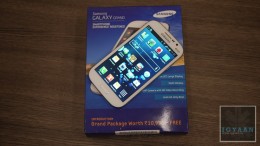
This has to be a world first, as well as a first for iGyaan. We managed to grab a box of the Galaxy Grand pre-sale and pre release and we decided to do an unboxing. The box of the Galaxy Grand Duos in India has the device, a charger, handsfree, USB cable and documentation along with the 2100 mAh battery pack. The final retail box will also have the flip cover and bundled downloads, along with 50 GB of Dropbox for your account.
Box

At first the Galaxy Grand looks like a fuse between the S3 and the Note 2, however it has features of neither (except the looks). The Samsung Galaxy Grand is powered by a 1.2GHz dual-core processor, it has 1 Gb of RAM and 8GB internal storage . The Grand also belongs to the DUOS series since it a dual sim phone and fared quite well in our benchmarks video. The front of the device has a 5 inch 480×800 px display which surprisingly is very clear and vivid with good outdoor visibility. The phone also has multi window which we demonstrated in our video.


On the back, the Samsung Galaxy Grand features an 8 megapixel primary camera with LED flash. The build quality of the phone is also standard Samsung style, so plastics all round, keeping manufacturing costs low for the device. Samsung Galaxy Grand comes with Jelly Bean and Touch Wiz designed for Jelly Bean. So Samsung though it fair enough to stuff the phone with features like “direct call” and “popup video” from the Galaxy S3 and Note 2.


You might also like:

Related Posts Plugin for WordPress, Blogger...

Infolinks In Text Ads