Chitika

Showing posts with label App iPad / iPhone. Show all posts

Tuesday, March 5, 2013

iOS apps for resellers


Whether you’re cleaning out your closet, reselling items that you purchased at a sample sale, or selling your own original works of art, apps can help you stay on top of your online reselling ventures. 

I run my own small reselling business. I purchase items at retail sample sales—giant sales that retail businesses hold to get rid of extra merchandise, usually at a significant discount—and then I sell them on eBay for a profit. My reselling business doesn't exactly pay the bills, but it does bring in a decent amount of extra income. Since I'm based in the San Francisco Bay Area, traveling to these sample sales (which often take place in Los Angeles or New York) puts me on the road a lot, with little more than my mobile phone for company.  Luckily, I can use my phone to check and manage my eBay auctions, track my expenses, log inventory, and even create listings. 

Here are five apps that I use to stay on top of my reselling business.

eBay
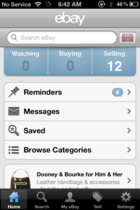
Keep track of your current auctions with eBay on the go.
eBay is a reseller’s most valuable resource, and its mobile app is pretty helpful, too. The eBay app lets you manage and track the items you’re selling, communicate with potential buyers through the eBay messaging system, and even sell items directly from your mobile phone. 

The eBay app has a couple of important features for resellers. First, its search function allows you to search eBay for whatever item you plan on selling. It’s always a good idea to run a search for an item before posting it for sale (and perhaps before purchasing it for resale), because you’ll be able to see what it’s selling for on the auction site, and hence what price you can reasonably ask for. You can search the eBay app by using key words or by scanning a UPC, EAN, or QR code; and you can refine your search to show completed listings or sold items only. 

Searching for completed listings will let you know if other sellers are successfully selling the items you’re looking to sell. Searching for sold items will let you know the prices that the items are going for. 

You can even create new listings straight from your phone.
Use the eBay app to track your active listings, to relist unsold items, to accept or reject best offers on items that have a fixed price, and to answer buyer’s questions through the eBay messaging system. You can also list new items. Though using the phone app to create a new item listing is harder than using your primary computer, posting your item right away can help ensure that your auction ends at the right time. (Hint: you’ll sell more items if your auctions end on Sunday afternoons.) In addition, eBay occasionally offers mobile listing promotions, such as not imposing final value fees if your item sells. This can save you quite a bit of money, since final value fees come to around 9 percent of the total sale price of your item.


PayPal

If you resell through eBay, you probably accept PayPal payments. But just because you have the eBay app doesn’t mean you shouldn’t also download the PayPal app. PayPal’s app lets you track your PayPal account balance, which is helpful for resellers who want to ensure that they’ve been paid.
PayPal lets you complete secure financial transactions with your buyers.
Because payments post to your PayPal account instantaneously, checking your PayPal account is a simple way to determine whether you’ve received payment for an item. The eBay app will alert you when a buyer makes a payment, but it’s still a good idea to double-check your PayPal account to confirm that payments have posted before you ship items. 

You can also use the PayPal app, as a reseller, to send payments to users (for example, if you want to offer a refund), request money (for example, if you want to do an off-eBay transaction), or find local businesses that accept PayPal payments. PayPal transactions are sometimes covered through seller and buyer protection, so you don’t have to worry about foul play. 


Square

If you're selling an item in person, complete the transaction with Square.
Even if you’re just a casual reseller, eBay takes up to 9 percent of your total sales price, and PayPal takes another 3 to 4 percent. But if you’re savvy, you can avoid these fees by selling in person and taking credit cards that use Square’s mobile card reader and app. 

Square is a credit card reader that attaches to your phone or tablet’s headphone jack and works in conjunction with a free app for iOS and Android devices. To obtain a free Square card reader, you just sign up on Square’s website. Square charges 2.75 percent per credit or debit card swipe (Visa, MasterCard, Discover, or American Express), so you can sell items offline while still accepting card payments. Use Square’s card reader and app to sell items through Craigslist, at a garage sale or flea market, or to your next-door neighbor.

Evernote

Evernote helps you keep track of your inventory.
Smart resellers keep track of their inventory. This task is a little different from expense tracking, since you can’t deduct the cost of unsold inventory at the end of the year. 

A note-taking app such as Evernote is practical for inventory tracking. Evernote is especially helpful because it can sync notes, lists, and photos across multiple platforms, enabling you to access your notes from any device. 

One way to keep track of inventory with Evernote is to snap photos of the front and back of all receipts connected with your inventory purchases. Doing so will help you keep track of how much you paid for each item (including tax, which should factor into your calculation of your final profit), when you purchased the item, and whether you can return the item if it doesn’t sell. 

Purchasing discounted items from stores with good return policies (such as Nordstrom Rack, Saks Off Fifth, and Neiman Marcus Last Call) is a great way to stock up on no-risk inventory—if the items don’t sell, you can return them and get your money back. But you need to keep track of the return-by date for each item, or you may find yourself stuck with unsellable inventory. 

FreshBooks
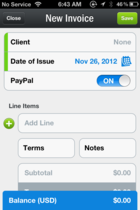
FreshBooks is a handy tool for filing invoices, logging hours worked, and billing clients.
If you flip new items for profit, or resell older, used items for profit, you're legally obligated to report this profit to the IRS. One benefit of this is that you can deduct costs associated with your reselling business—such as the cost of parking and gas if you go to a store to pick up an item, or the cost of storing inventory (if you have to rent a storage locker, for instance).

To keep track of expenses and other tax-related issues associated with your reselling efforts, download an accounting app such as FreshBooks. FreshBooks lets you create invoices, keep track of clients (the app is free if you have fewer than three clients), track time, track expenses, manage projects, and create estimates. As a reseller, you’ll most likely be using the time-tracking and expense-tracking features; but if you’re reselling offline, you can also use the invoices option to create invoices for particular clients.

You can use the time-tracking feature to create timesheets to help you keep an eye on how much time you’re investing in your reselling efforts. The expense-tracking feature lets you log expenses; and if you attach a photo of each receipt, you can keep track of the money you spend on reselling-related costs.

Your mobile device is your best business asset

Whether you’re an eBay Power Seller or just a casual closet cleaner, your mobile device can help you resell items for profit and to clear valuable shelf space. The five apps discussed here will enable you to keep track of your expenses, inventory, PayPal balance, and online auctions, and even to accept credit and debit cards for in-person sales.

Friday, March 1, 2013

YouTube for iOS With ‘Send to TV’ Functionality, Lets You View Videos On Xbox 360, PlayStation 3 Or Smart TV

If you enjoy watching informative or downright entertaining videos on your way to work or school, you likely have the YouTube app for iOS installed in a prominent place on your home screen. However, the YouTube videos you so enjoy on your small device may soon make it on the big screen as a “Send to TV” feature has been implemented in the last update of YouTube for iOS, following suit after an update for the Android app earlier this year was released, which made the same much-needed improvement.

For those who might not remember, YouTube and Netflix worked together on a new standard, which it unveiled last month, allowing mobile apps to quickly “beam” content over to a TV or set-top box, and even your Xbox or PlayStation 3. While the standard allows all developers to make it much easier to enable connectivity between an A device (such as a smartphone) and a B device (such as a set-top box), not major third-party apps have implemented this as of yet.

YouTube for iOS

YouTube has implemented this new standard very seamlessly: a new “Sent to TV” button has been added to the video view on every video capable of being played on a large screen TV. From there, your TV, set-top box or console will be discovered and the content will automatically show up; after this step, your mobile device will function as a remote, with all of the controls that you would normally use to play, pause or scrub through the video still available on the device, and with immediate effect on what’s played on your TV.

YouTube iOS

The official YouTube app for iOS has certainly come a long way since it was introduced last year. Replacing the built-in iOS YouTube app, which was removed with the release of iOS 6 late last year, the new YouTube app features a new layout and more immersive video features. More interaction with TVs set-top boxes and consoles are just what is needed to solve the problem of connectivity between big-screen TVs and smaller Internet-connected devices.

YouTube iOS 2
Similarl to the previous versions, YouTube for iOS is available free of charge from the iOS App Store.

(Source: YouTube for iOS on the App Store)

Thursday, February 28, 2013

12 Best Games on the iPhone


Angry Birds Star Wars

The 12 Best Games on the iPhoneAs brutishly mercenary as a Force-enabled version of Angry Birds might seem, the newest variant of Rovio's mobile juggernaut is actually pretty good. The standard Birds gameplay gets bolted onto iconic sequences from the Star Wars saga and players will be able to deflect lasers with a lightsaber and use Force Push on the franchise's rickety environments.

A Good Match for: Iteration addicts. We've reached the point where each new AB release shows interesting tweaks to a core formula. The smash-it-all gameplay has moved from a see-what-happens model to one where various abilities exist to help you force the outcome you want. The Star Wars-centric skills in ABSW aren't going to replace careful aiming and application of momentum but they make it so you won't need as much luck as in the past.

Not for Those Who Want: Their childhood memories unsullied. If you break out in hives at the mere mention of Episodes I through III, then you should probably act like this game doesn't exist. Your younglings, though, may not give you a choice.

Here's how it looks in action. Purchase from the App Store.


Bad Hotel

Bad Hotel is a comedy. And a tower-defense game. And the most stylish game about building a hotel that shoots ice at monsters that we've ever seen. It's an unusually well-rounded iPhone game that looks, sounds and plays superbly. You stack rooms upon rooms to build a hotel while enemies attack. Some of your rooms can shoot them, others repair damaged rooms and others collect money from guests. None of this is played straight, as levels are packed with absurd monsters and narrated by the kind of people one might occupy Wall Street to protest against.

Oh, and this is also a music game, because, as you build your hotel, it pulses with music that is shaped to match your tower. Each room you add contorts the soundtrack. Yes, this is for real. The creators of the game explained it all to us.

A Good Match for: Those looking for something more artsy and musically-interesting, as well as those looking for a game with jokes written for
grown-ups.

Not for Those Who Want: The world's most precise controls, though a recent update did improve them a bit.

Here's how it looks in action. Purchase from the App Store.


The 12 Best Games on the iPhoneDrop 7

AreaCode's numerical puzzle game may be the most perfect short-session game ever created. As falling numbers land on a 7×7 grid, you need to make them disappear by matching the number of vertical or horizontal spaces match the digit. Yes, it sounds tedious but when the rules finally click in your head, it's a lifetime addiction.

A Good Match for: Anyone who spends a lot of time waiting for things or people. Whether it's stuck in traffic or waiting on a queue at the bank, a few quick levels of Drop7 will make any kind of stationary drudgery more bearable.

Not for Those Who Want: Productivity. It take superhuman willpower to resist the siren call of Drop7 and if you want to get anything done after installing it, make sure your iPhone's out of reach.

Here's how it looks in action. Purchase from the App Store.

The 12 Best Games on the iPhone

Ghost Trick

Ghost Trick: Phantom Detective was a triumph on the DS, a super-cool story/puzzle game drowning in great style, cool animation, and a funny, truly touching story. It makes the transition to iOS even better than you'd think, and many of the Rube Goldbergian puzzles work even better with the iPhone or iPad's touch-screen.

A Good Match for: People who like jokes, animation fans, music buffs, pomeranian owners.
Not for Those Who Want: A lot of gameplay, a non-linear story, a game without any pomeranians.

Here's how it looks in action. Purchase from the App Store.

Hero Academy

The developers at Robot Entertainment must know that friends don't always get along. That might be a reason that they made Hero Academy, a turn-based competitive strategy game that pits two people's virtual squads of fantasy adventurers against each other. The grid-based battlefield tempts you with loot that can power up characters and you'll find yourself . Much of Hero Academy's appeal comes from its asynchronous game design, which gives you time to plot out the perfect turn. And the waiting to see what your opponent sends back? That's almost as good as making your own move.

A Good Match for: Tolkien-loving chess players. Like the classic board-game simulation of war, specific units have different abilities. So, the a Dark Elves can leech energy and other warriors can force enemies back a square. And it all unfolds in a milieu that owes much to the Lord of the Rings mythology, which means you'll shout out "You shall not pass!" a lot.

Not for Those Who Want: No microtransactions. Hero Academy isn't the worst kind of pay-to-win game but the temptation to plunk down some cash for deeper and more varied reserve of troops is strong.

Here's how it looks in action. Purchase from the App Store.

Horn

An Unreal Engine 3-powered adventure, Horn is the closest thing the iPhone has to a ‘triple A' console title. A young boy awakens to find the land overrun by gigantic stone creatures—creatures that were once human. Discovering the means to forge magical weapons to break the crystal curse, the boy embarks on a quest to restore fleshiness to humanity.

A Good Match for: Action role-players. This is the iPhone's The Legend of Zelda, only without the Zelda.
Not for Those Who Want: Bite-sized game sessions. Though a good portion of Horn is broken up into shorter, easy-to-digest levels, your digestive system would need to be in trouble for you to get much done in the game during a bathroom break at work.

Here's how it looks in action. Purchase from the App Store.

Infinity Blade

Players who enter Chair Entertainment's medieval epic get embroiled in an endless skein of mano-a-mano duels with giant ogres and demonic knights. The combination of treasure grabbing, loot acquisition and slash-&-dodge combat will keep players glued to their tablet for hours.

A Good Match for: Console game players. Infinity Blade raised the bar on the level of persistent visual detail developers could accomplish on iOS and its swipe-and-tap controls make each swordfight immersive in way that button-pressing on a gamepad can't match.

Not for Those Who Want: Variety. Infinity Blade doesn't over-reach in terms of what it offers. It does what it does well, but you'll get the entire gist of the game in about 15 minutes.

Here's how it looks in action. Purchase from the App Store.

Letterpress

Most word games feel polite, don't they? Sure, you may gnash your teeth when you lose in Scrabble but you never feel like throttling your opponent. When you play Letterpress, you'll feel like punching the person you're playing against. That's because Letterpress is actually a ground war in word-game form. Each word you spell is a daring grab for letter-filled real estate and every advance can get repulsed by an opponent's clever coinage.
The 12 Best Games on the iPhone 


A Good Match for: Risk players who love to read. The strategy at work in Letterpress is of a more rapid-fire nature than in other digital word games. You'll need to figure out how to secure and hold territory while figuring out which words you can make form the jumbled-up letters on the board.

Not for Those Who Want: Quick games. Though Letterpress can be fast-paced, some games can see-saw back and forth for a while, even with a clear end in sight. A good fight is its own reward but sometimes you just want the other guy to fall over.

Purchase from the App Store.
Here's how it looks in action.


Need for Speed Most Wanted

The folks who already make the best racing games for the iPhone get their hands on EA's premier racing franchise and knock it out the park.

A Good Match for: Speed demons. Need for Speed Most Wanted feels fast in a way that you can't pull your eyes away from. The experience is smooth and shiny, putting every other iDevice racing title to shame.

Not for Those Who Want: Customization. The cars you get in Need for Speed pretty much stay the same. It's great that the simulated physics make various classes of cars feel different from each other, but can't do anything visually to make them feel like your own.

Here's how it looks in action. Purchase from the App Store.

Plants vs. Zombies

The cartoony garden-defense blockbuster soars on iPhone thanks to touch inputs and a port that sacrifices very little from other versions of the game.

A Good Match for: Urban gardeners. PvZ's all about cultivating flora to stave off hordes of the undead, something that anyone trying to grow tomatoes in a windowsill planter can probably relate to. Those would-be farmers probably need a bit of digital payback.

Not for Those Who Want: Top-down tower defense. PvZ doesn't deliver the general's-eye view of the battlefield that you get in games like Fieldrunners, so you may not feel quite as god-like when killing zombies.

Here's how it looks in action. Purchase from the App Store.

Super Hexagon

Super Hexagon is a game that will kill you in seconds. A pattern of geometric shapes flow towards the center of the screen to the beat of the music, and your task is to dodge them. You won't. You'll die in seconds. If you get really good, you'll die in minutes. And you'll love every minute.

A Good Match for: Eye-hand coordination masters. Seeing the path your little dot needs to be in is one thing. Getting there is another thing entirely.
Not for Those Who Want: Lengthy gameplay sessions.

Here's how it looks in action. Purchase from the App Store.


The 12 Best Games on the iPhoneTemple Run 2

Maybe you were a Temple Run skeptic, someone who thinks that a game as obscenely popular as this one can't be any good. But chances are that once you started swiping through the infinite escape of the runaway hit's , you'd find it hard to stop playing. 

Temple Run 2 keeps the first game's simple control scheme and eminently approachable premise and layers on improved graphics that make idol theft look a lot prettier.

A Good Match for: Travel magazine subscribers. The additions of zipline, minecart and more fantastic locations make Temple Run 2 feel like more of a globe-trotting adventure than its predecessor.

Not for Those Who Want: Huge iterative leaps between sequels. The core experience remains the same in this follow-up, so if you were hoping for fancy new ideas in Temple Run 2, you're out of luck.

Here's how it looks in action.
Purchase from the App Store.

Friday, February 22, 2013

20 best iPhone and iPad apps this week

Jackie Junko
Jackie Junko is a colourful, well-crafted iPad storybook app for kids
 
It's time for our weekly roundup of new and notable iOS apps – those released for the first time this week, or which have been newly ported from iPhone to iPad (or vice versa).
The roundup includes apps and games, and the pricing in brackets relates to the initial download – some apps listed as free may include in-app purchases. The Android roundup was published earlier in the day.
Here's this week's pick of the App Store:

Sunrise Calendar (Free)

The march of apps aiming to replace Apple's preloaded tools on your iPhone continues. Sunrise is a very slick calendar app designed to work with Google Calendar, Facebook and LinkedIn (the latter two are optional though) to keep you organised. It's very intuitive to use. The fear, as with any app like this, is that a bigger technology company will quickly buy and mothball it.
iPhone

Jackie Junko (£2.99)

This lovely app from developer Springy Thingy popped up in my App Store RSS feeds and immediately stood out for its craft. It's a storybook app for children based on boats and animals, with 15 pages of interactivity and animation for kids to play with.
iPad

Traktor DJ (£13.99)

Profiled at more length earlier in the week, Traktor DJ is the work of Native Instruments: an iPad DJing app based on its popular Traktor software and hardware. Forget virtual decks: this is all based around multi-touch manipulation of waveforms to mix, scratch and loop, with clever Dropbox syncing for professional DJs to use it as a preparation tool.
iPad

Red Nose Day In Your Pocket (Free)

Comic Relief is gearing up for its UK comedy telethon on 15 March, with this official app offering news, videos and mini-games to get viewers engaged before the event. Stephen Fry, Keith Lemon and Mary Berry all make appearances.
iPhone

A Midsummer Night's Dream: Explore Shakespeare (£9.99)

This is part of Cambridge University Press' series of digital Shakespeare plays, offering the full text of A Midsummer Night's Dream along with an audio performance, photos of professional productions, glossary definitions, notes, word-clouds for each scene, theme-lines to navigate the key themes, and suggested activities. It sits alongside another new release for Twelfth Night.
iPad

Motor World: Car Factory (Free)

Freemium game Motor World: Car Factory takes its visual cues from Tiny Tower and Pocket Planes, as you marshal a factory of pixelly people to build cars, upgrading your facilities as you go. There's a CSR Racing-style mini-game where you race, and a genuine addiction factor – I write this as someone who was playing it at 2am earlier this week.
iPhone

O2 Matchday (Free)

An intriguing app from O2 UK for rugby fans, designed to be used while watching England's home games in the Six Nations tournament. The app streams live audio from the match referee's mic, so you can listen to every shout. Live stats, scores and squads are also included, as well as match previews beforehand. Warning: it won't work if you're actually at Twickenham for the games.
iPhone

Albumatic (Free)

Will the next big thing in mobile photo-sharing be collaborative albums with friends? Several startups are hoping so, with Albumatic the latest example. The idea: you and friends nearby take photos to be stored together in online albums, with other friends able to watch them in real-time as the pics flow in.
iPhone

Haze (£0.69)

Yet another app hoping to consign an Apple app to your Junk folder. Haze is a weather app that strips out clutter to focus on temperature, rain chances, forecasts and windchills, all with a simple swipe-based interface. Oh, and pretty colours, which always helps. Well, it helps when the forecast is grey and wet, anyway.
iPhone

Audiobooks from Audible (Free)

Amazon's audiobooks service Audible has been available on iPhone for a while, but it's now been ported to iPad – which arguably is just as useful a device for listening to literature. As on iPhone, the app offers a catalogue of more than 80k audiobooks to download to the device.
iPad

Wanderer:War Song (£1.49)

More fun for fans of the "well-tooled hero fights monsters several times bigger than him" school of combat games (see also: Infinity Blade). Developed using the Unreal Engine 3, the scenery and beasties look marvellous, while its promise that you can move freely during combat may appeal to gamers looking for a new, less-on-rails challenge.
iPhone / iPad

Emma in Africa – Book Puzzle (Free)

Another children's app this, and just as well-crafted. Emma in Africa combines storytelling – about a pre-school-aged explorer travelling in Africa – with digital shape puzzles. If your children have been entranced by David Attenborough's Africa TV series, Emma may be the perfect interactive follow-up.
iPad

Walkonomics (Free)

This is a really good idea: an app that gets people to rate the "pedestrian-friendliness" of streets, or just browse the database of other users' ratings. Streets are scored out of five in a range of categories: road safety, hilliness, fear of crime and so on. It works for England, New York and San Francisco.
iPhone

Sterling (£1.49)

I like the idea of Sterling, a "simple budget planner" app that gets you to input rough calculations about spending and saving, complete with a "What If?" feature that lets you mess around with figures when trying to plan ahead, without actually changing the real numbers.
iPhone

Village Voice (Free)

US publication Village Voice has released a new app that's less a magazine, and more a city-guide. It includes its events and concert calendar, as well as blogs on local New York politics, music, food and arts. Photo slideshows and daily deals are also included: it looks an invaluable app for anyone travelling to the Big Apple.
iPhone

Hell Yeah! Pocket Inferno (£0.69)

This game is published by Sega, and developed by the team behind console indie game Hell Yeah! Wrath of the Dead Rabbit. It sees you playing Ash – "a devil rabbit and the prince of Hell" – leaping through a side-scrolling game seeing off monsters. 50 levels are included, as are in-app purchases.
iPhone / iPad

A Troop is a Group of Monkeys (£1.49)

Yes, it is. Different to a pandemonium of parrots or an ostentation of peacocks, as you'll know. Or will you? This marvellous children's app aims to teach kids the plural nouns for various animals, aided by music and rhyme. Oh, and by the animals themselves, who have bags of character. Notes for teachers and parents are also included.
iPad

Mokriya Craigslist (Free)

This app isn't from listings website Craigslist itself, but it IS "officially licensed" by the company. What's more, it's very slickly designed – more so than the site by a long chalk. The app helps you browse listings, including by location, while setting alerts and push notifications for specific kinds. You can also post your own listings from within the app.
iPhone

ShowScoop Concerts (Free)

Yes, that band you're going to see live sound good on record, but what if their gigs are shambolic? ShowScoop is a website (and now an app) trying to provide this information. It encourages gig-goers to rate bands on metrics like stage performance, crowd interaction and sound quality. It's almost a Metacritic for live music.
iPhone

The Gods: Rebellion (£0.69)

Finally this week, one more entry in the Mythical theme / giant monsters / big-sworded hero genre, from Chillingo. It's an action game taking its cues from God of War, Infinity Blade and others, with Unreal-powered graphics and in-app purchases to boost your chances if necessary.
iPhone / iPad
That's this week's selection, but what apps are you enjoying on iOS this week? Make your recommendations or comment on the apps listed above in the Comments section.

You might also like:

Related Posts Plugin for WordPress, Blogger...

Infolinks In Text Ads