Chitika

Showing posts with label iPad Tablet Review. Show all posts

Wednesday, March 27, 2013

Apple iPad Review: The Retina Display Redefines the Tablet

The 2012 refresh of the Apple iPad wows, but not for the reasons so often associated with Apple products. After all, at first glance it appears to be the same product--it's just barely thicker and a tad heavier than the model that came before it. But that impression changes once you turn on the iPad's screen: That's when the new iPad not only takes your breath away but also demonstrates how Apple has redefined the tablet game-again. 


Part of that redefinition is in the price. Other tablet makers continue to struggle to offer innovation at the same price the baseline iPad 2 has had for the past year. In contrast, Apple is introducing its third-generation model (Apple is calling it just “iPad,” not “iPad 3”) with a dramatically mproved display at the same prices as before: $499 for 16GB, $599 for 32GB, and $699 for 64GB, plus $130 extra to add AT&T or Verizon LTE 4G connectivity (mobile broadband service extra; at launch, only Verizon will offer mobile hotspot services).

If you're contemplating which size to choose, consider this: The 64GB iPad I tried had only 57.17GB available to me before I even downloaded a thing. And all of your lovely apps, images, and high-definition 1080p videos will take up more room than before. My own images, imported via iTunes, took up more than twice the space on the new iPad as they did on the iPad 2. So you might want to consider springing for more storage, since the iPad doesn't offer any on-board expansion slots as Android tablets typically do.

iPad: It's All About the Retina Display

Apple reset the standard for displays when it introduced its Retina display for the iPhone 4. Once you've seen a mobile world without pixelated, blurry text, you can't accept anything less. That's why I was disappointed that the iPad 2 didn't have the new screen a year ago; by then I was already accustomed to the iPhone 4's higher-pixel-density display, and I was loath to settle.

With the third-generation iPad, you're definitely not settling--at least when it comes to the display. (You are with regard to the tablet's weight and size, but I'll get to that later.) This model's 2048-by-1536-pixel, 9.7-inch display successfully sets another standard, this time for what users should expect of their tablets.

This iPad is the first tablet we've tested to score Superior marks, our highest rating, across our subjective screen-quality evaluation. On our grayscale test pattern, it produced the best balance of blacks and whites we've seen; on our color-bar chart, it exhibited a lovely spread of colors, with no colors blown out at the far end of the scale (something we see often on Android tablets). The colors looked rich and warm, more so than on the iPad 2. The richness of the colors made our images seem just shy of being oversaturated, though that could be in part because we're not used to seeing the images on such a high-resolution display anywhere.

Most telling to me were the results of our still-image tests. In a group-portrait photo that matches the iPad's native resolution, the new iPad showed the most realistic skin tones and the best handling of neutral browns we've seen yet; for one person in the photo, the reddish highlights in the hair were evident for the first time on a tablet (usually, those highlights simply blend into brown). On a 4K-pixel still image that we let iTunes optimize for display on the iPad, we saw outstanding detail and more subtle color gradations than we've seen on any other tablet to date. The image popped with a sense of dimensionality we haven't seen on tablets.

Text was crisp, with no jaggies in sight. However, while text universally looked lovely on the display--not surprising given its outstanding 264 pixels per inch--we quickly noticed that the iPad's Retina display and Apple's upscaling can't perform miracles. Web images, as well as graphics in games, apps, and many magazines in the Newsstand, looked disappointingly fuzzy and overblown on the new iPad. The apps will catch up, eventually; it's a simply a matter of developer time and resources. Until then, be prepared for mixed results with your apps.

iPad Inside and Out

To be honest, I decided to focus so much on the display in this review because anyone who is buying a new iPad is likely doing so for that feature alone. Some people will rave about the 4G speeds, should they take that option; others may point to the quad-core graphics engine, which should make iPad gaming even better than it is today. For anyone considering the upgrade quandary--whether an iPad with a Retina display is worth the money, versus an iPad 2 at $100 less--the answer is yes, the display alone is worth the extra outlay. You'll feel the difference every time you read on the tablet, every time you use an app with optimized graphics, and every time you view your pictures.

You'll also see the difference whenever you play or capture a 1080p movie, or take photos with the new 5-megapixel camera (now dubbed “iSight,” and vastly improved over the iPad 2's pitiful less-than-1-megapixel camera). The camera app was a pleasure to use compared with those on the Android tablets we've looked at, too. Sure, it lacks the finer exposure controls that the Android models offer, but Apple's app simply works more smoothly--it's quicker to focus, and it's more responsive overall, which means you're more likely to get the shot you're after.

Inside the iPad, Apple has applied moderate improvements to the tablet's guts. The new slate runs on an A5X dual-core Cortex A9-based system-on-chip, but it now has a quad-core graphics engine. That translates into what appears to be reasonably powerful graphics muscle, and solid overall performance. In the benchmark tests we ran at launch, the iPad excelled at some metrics, as you can see in the GLBenchmark 2.1.2 charts below.
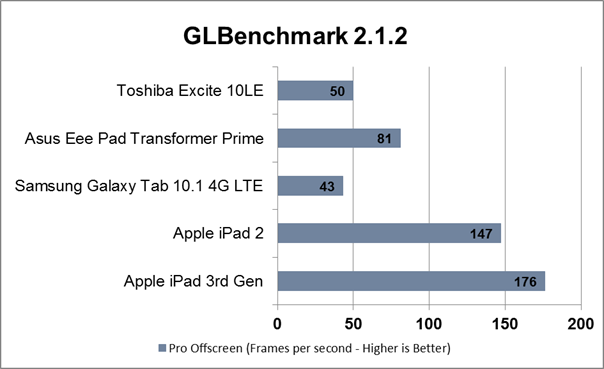


On other metrics, including two other GLBenchmark tests and our Web-page-load and Sunspider tests, the iPad matched the iPad 2's performance.

[See "New iPad vs. Android Tablets: Is It Game Over?" for more in-depth analysis of how the new iPad stacks up to the top Android tablets.]

Ultimately, how good the iPad looks and performs will depend largely on the content you're viewing. Most things you view on the new iPad will look better than they do on the iPad 2. Books, magazines, apps, and Web pages all have the potential to look great, like nothing you've seen before, and games will be able to advance in graphical complexity beyond what we have today. It will take time, however, for developers to catch up and make that wholesale shift. Until then, be prepared: Your results will vary dramatically, ranging from disappointing to brilliant.

While this iPad lacks Siri support--an odd omission, given that last fall's iPhone 4S introduced Siri--it does add integrated voice recognition. I really liked using the built-in speech recognition tool, powered by Nuance. That said, I didn't like that I needed to be connected online, since, like Siri on the iPhone 4S, it makes calls back to the Apple servers to provide the service. But it was very accurate and responsive when I tested it. I also wish that the device had a way to perma-hold the microphone button on the keyboard (I didn't stumble across it, if one exists) so that I can dictate more than just a quick sentence here and there. I suppose, however, if that were the intent of the voice feature, I'd be using a dedicated app for that.

The Big iPad Stumble

For all of my raving about the display, I have to note that Apple broke with tradition and didn't make this iPad thinner and lighter than its predecessor. The new iPad is slightly thicker (0.37 inch) than the iPad 2 (0.34 inch), the Samsung Galaxy Tab 10.1 (0.34 inch), and the Asus Eee Pad Transformer Prime (0.33 inch). The Toshiba Excite 10 LE, which currently holds the crown as the slimmest tablet available, measures just 0.3 inch.

While I understand that the increased girth is to accommodate the new iPad's bigger battery, its 4G radio (on those models), and the Retina display, I'm more concerned about the iPad's weight. I surveyed more than a dozen editors in our offices, and all immediately noticed a difference between the new iPad and its competitors, including the iPad 2 and the lightest of the 10-inch-class Androids, the 1.12-pound Toshiba Excite 10 LE, plus the sleek 1.29-pound Asus Eee Pad Transformer Prime.

The third-generation iPad weighs 1.44 pounds for the Wi-Fi-only version and 1.46 pounds for the 4G version. It's a slight but noticeable increase from the iPad 2's weight of 1.33 pounds for the non-3G version and 1.35 pounds for the 3G version. Heavier is not the right direction for tablets to take, and it goes against the trend among competing Android models, which are becoming lighter.

The difference in weight is palpable, and it may become an issue as you use your iPad to show off content, using your dominant hand to navigate, and your weaker hand to support the device. It's also a shame, because this iPad makes reading on an LCD more viable than ever, yet the added weight will deter many people from engaging in long reading sessions. One colleague likened the weight difference between the Toshiba Excite 10 LE and the iPad to the difference between an empty cafeteria tray and another tray laden with a plate of food.

Bottom Line

Although the extra weight is a disappointment, in the scheme of things it doesn't hurt the new iPad's ascent to the throne. Apple remains firmly ahead in terms of an app ecosystem, with more than 200,000 apps deemed "iPad" apps. The new, high-resolution display will pose some challenges to the iOS developer community, but I have no doubt that the community will rise to the occasion quickly, thanks to Apple's insular product strategy.

If you're in the market for a tablet--and if you don't mind the tethers that iOS and Apple impose (devotion to iTunes, the inability to drag and drop files onto the tablet, the lack of file-level control)--then the new iPad is the clear winner. The third-gen Apple iPad redefines the tablet market, and raises the bar impossibly high for the competition.

Friday, March 15, 2013

iPad Mini 2: Release date, price, specs, news and rumours

iPad Mini review
All the latest on the iPad Mini 2's release date, price, specs, news and rumours

The iPad mini went on sale in November 2012, and as is the way with Apple there are plenty rumours to be found regarding the next iteration of the device.
Apple, as is its custom, will never be drawn on speculation about upcoming devices - but that hasn't stopped the whisperings circulating around the internet.

This is an article about the iPad Mini 2 - we also have news on the full sized iPad 5, and the rumoured iPhone 5S and iPhone 6 smartphones.

Apple iPad Mini 2 - Screen

Probably the biggest gripe with Apple’s first entrant in the small screened tablet market was the resolution of its screen. With just a 1024 x 768 pixel resolution and 163 pixels per inch, it was the same tech we first saw on the iPad 2 and those dastardly pixels were easy to spot.

Compare that resolution to its two main competitors, Google’s Nexus 7 and Amazon’s Kindle Fire HD which both sit at 1280 x 800, you can see it was outdated before it was even released.

Website Patently Apple, which describes itself as ‘celebrating Apple’s spirit of invention’ reported early February that Au Optronics is making a screen for the iPad mini 2 with a display pixel count of 324 pixels per inch.

Looking even further ahead, it claims sources say Apple has asked LG to make a premium class iPad Mini display for the iPad mini 3 – which would push pixel density to over 400 pixels per inch.

Apple iPad Mini 2 - release date

Apple had pretty much stuck with a yearly release cycle of its iOS devices until it dropped the fourth generation of the iPad barely 6 months after the third. So is Apple’s release schedule all up in the air? Some sources seem to think not, with many believing the iPad mini 2 will in fact live on until its first birthday without being replaced.

Apple is now on a bi-annual update schedule for its iPad range, according to one industry analyst, which could mean new 9.7-inch and 7.9-inch models as soon as March.

After consulting his sources at this week's CES expo in Las Vegas, Brian White of Topeka Capital Markets is convinced that a new fifth-generation iPad and a second-generation iPad Mini are on the agenda in the next couple of months - according to AppleInsider.

White told investors that the iPad 5 would be even thinner and lighter than the third and fourth generation models, while a processing bump to the A6X processor was also mooted.

The new iPad mini would keep the same form factor, according to White, while there would be a bump in the engine room. White's note made no mention of recent rumours that the next iPad mini would boast the same high-resoution Retina Display as the iPhone and iPad.

Apple iPad Mini 2 - specs

It wasn’t just the screen resolution that Apple recycled from the iPad 2, the processor was the same too. When the iPad Mini comes to the end of its cycle this processor will have been around for 2 and half years, a long time in the world of computers. So, expect this to get a big bump up, possibly to the A6X chip that runs the iPad 4 so smoothly.

Monday, March 4, 2013

Compare 6 iPad Mini Keyboard Cases

The iPad mini is portable enough to go anywhere and can run the more than 300,000 apps in the App Store. In fact, the 7.9-inch mini is so versatile it can easily pinch hit for a PC, whether you’re composing emails, word processing or taking notes in meetings. To make typing faster and more comfortable, several companies offer keyboards for the iPad mini. All of these useful accessories prop up your tablet to give you a laptop-like experience, and some double as cases to protect your investment. We tested six iPad mini keyboard cases to find out which ones offer the best mix of design, features and comfort.

1. Belkin Portable Keyboard Case

Belkin, one of the major Apple accessory makers, has now added a keyboard case for the iPad mini to its portfolio. Like its similar accessory for the full-size iPad, the Portable Keyboard Case for iPad mini protects the mini with a thin rubberized sheath. For $80, this case also doubles as a stand, though it could be easier to transform.

2. onic Keyboard Tablet Leather Case


The $35 Ionic Keyboard Tablet Leather Case is an attractive, affordable leather coverall for the iPad mini. It also happens to pack a detachable Bluetooth keyboard inside. Perhaps the best part of this accessory is that it costs about half as much as most of its competitors. Find out how much mini keyboard you get for your money.

3. Kensington KeyFolio Pro 2


Designed for iPad mini owners looking to get some quality work out of their tablet, Kensington's $79 KeyFolio Pro 2 is a professional, portfolio-style case with a 7-inch Bluetooth keyboard tucked inside. The Pro 2 lets you adjust the angle of the iPad mini--a feature many simiilar accessories lack--and its keyboard detaches from the case.

4. Logitech Ultrathin Keyboard mini


A keyboard case for the iPad mini should be much like Apple's tablet: thin, light, stylish and functional. The Logitech Ultrathin Keyboard mini ($79) is all of the above. Using its Smart Cover-like magnetic spine, this accessory protects the iPad mini during downtime and, when there's work to be done, it pairs the slate with a spry Bluetooth keyboard. Find out why this is the iPad mini keyboard to get.

5. Luvvitt Backlit Ultrathin Keyboard Cover


What's missing from many iPad mini external keyboards? A backlight. Not so with the Luvvitt Backlit Ultrathin Keyboard Cover. This $79.99 accessory adds an illuminated layout for working in dimmer environments. Is this keyboard case as bright an idea as it seems?


6. ZaggKeys Mini 7

Designed to slip easily into smaller bags and purses, the iPad mini is going to take some abuse as it rubs up against keys and anything else you might have in your bag. The ZaggKeys Mini 7 wraps the iPad mini in a durable rubber case complete with a Bluetooth keyboard. Available for as little as $44.99 at Zagg's -- half its original $89 price -- this iPad mini keyboard case is a true bargain.

Thursday, January 31, 2013

iPad mini Review

When Apple announced the iPad mini, I was floored by the resizing of a year-and-a-half old tablet. To quote a good but crazy older friend of mine, I thought, “What kind of meshugaas is this?” Yet as I continued using it, I felt more and more certain that Apple may have been wrong about the 10″ design as the best tablet size. And it may have taken three and a half years for Apple to realize it, but when that company comes out with a late product, it doesn’t mess around.

The iPad mini is the best 7″ tablet available, by a longshot. But you may want to hold off on buying one.

Hardware

Externally, the iPad mini is absolutely stunning. It looks so good you could sell pictures of it. I can’t help but feel that this is what a tablet was always meant to be. Not a bulky 10″ iPad or the rounded, rubbery Amazon Kindle Fire. This beautiful work of art, the iPad mini, is a real tablet.

It’s brazenly thin at 7.2mm, thinner than every smartphone and tablet. The only thing thinner is the latest iPod Touch at 6.1mm. Even the iPhone 5 is thicker (7.6mm). It has a large 7.9″ display, which is both longer and wider than most 7″ tablets (it’s practically an 8″ tablet). The white bezel is especially convincing that the mini is a futuristic device; the cold, hard precision of the cut metal edges combined with the crisp aluminum case and clinical white bezel combine into the best looking tablet on the planet. The iPad mini also comes in black.

The improvements in design are magnificent in every way. Even after a month’s use I am still taken aback at just how precise and how fine the details are. The volume buttons are longer and fuller, the portrait lock/mute switch is perfectly machined, the power button protrudes only enough so that light reflecting off it enough to catch the eye. Even the microphone and speaker grills look brilliant. Competing smartphones with great designs only have  one or two beautiful aesthetic features. The iPad mini has them all.

Inside the mini is a very different story. With few exceptions, most of the internal components are a year and a half old. The A5 processor (A5r2, a second revision that’s smaller and slightly faster and more power efficient), the 512MB of RAM, the 1024×768 display…these were introduced on the iPad 2 back in March 2011. Remember, the latest iPad and iPhone feature the newer A6/A6X processor, 1GB of RAM, and Retina displays. That latter point is the most relevant for current iPhone owners.

While the IPS panel is stunning, with great color and light contrast and it gets very bright, it has a low pixel density of 163PPI, half that of the iPhone 4 (a two-year old device). The iPad mini does not have a Retina display. Every major new product release — the iPhone 4, 4S, 5, iPad 3 & 4, iPod Touch 4 & 5, MacBook Pro 13 & 15 — has shipped with a Retina display, and that remarkably high-resolution screen has helped define Apple’s stance in electronics. The display is our window into the computer, and the iPad mini is blurry and pixelated compared to all of Apple’s top products. Does this make the iPad mini a low-end product to Apple? Or has, as many fear, Apple begun acting like every other business and sell purely for profits?

The latter point is extreme, but there is a hint of truth to both when considering the iPad mini. Beauty on the iPad isn’t only skin deep, but it isn’t down to the bone. As you can read below, iOS 6 performs well and overall functionality is excellent, but so is the iPad 2, which Apple still sells for just $70 more. The two tablets are nearly identical, save for size, the Wi-Fi antenna, and the camera. Current iPad owners may feel cheated after buying the iPad mini because the only change is size; everything else is the same or worse with a few exceptions.

First, Wi-Fi reception has improved, albeit slightly, over previous iPad models. Every iPad has had a fairly limited range and required holding the iPad a certain way if the Wi-Fi connection was poor; that’s no longer the case with the iPad mini. It still drops signals at times, but overall Wi-Fi performance has improved.

Speaker quality is also excellent, though Apple (like most tablet makers) continue to resist using stereo sound out of stereo speakers. The iPad mini technically supports stereo sound out of the single speaker, but that’s like playing music through a pair of headphones loudly ten feet away; you don’t get the stereo quality, just stereo sound. With this new design and lighter frame there’s no reason why the iPad mini can’t have stereo speakers.

I highly recommend using a Smart Cover for the iPad mini for two reasons: first, it adds a bit of girth to the absurdly thin tablet, and second it adds a warm grip when carrying it around or when in use. The actual folding mechanism is fairly useless. The iPad mini is small and light enough to not need to stand up on a table. The only time I ever put it down is when I’m not using it. The iPad may be too big for extended use, but the mini is not.

One thing I will note with regard to video use is that because of the non-HD 1024×768 display, which has an aspect ratio of 4:3 (not widescreen), video quality is not HD nor does it perfectly fit the screen. Like all iPads before it (and all iPhones and iPod Touchs before the latest models), videos appear letterboxed. However, video quality is still excellent, and because of the great shape and feel of the iPad mini I preferred using it over the Kindle Fire or Kindle Fire HD. The Fire HD does offer better Wi-Fi performance and video is clearer, but the iPad mini is more comfortable to use. In effect it turns into a preference of video clarity and audio quality versus comfort. In every case I’d take the iPad mini unless Wi-Fi was really poor.

Software

iOS 6 is no different on the iPad mini than it is anywhere else. There are improvements to speed and efficiency, which you’ll see below in benchmarks, and it’s still overall very impressive. However, there are some quirks, like the settings page overflowing with things to change, and some things take too many steps to do.

In general I’m impressed with the iOS 6, but because the iPad mini is essentially a smaller version of the iPad 2, there’s nothing unique about it in terms of software.

Battery Life

The iPad mini boasts 10 hours of battery life just like every iPad before it, and for the most part that claim holds true. I’ve used it for a lot of video streaming and the battery lasts. If you were concerned about battery life because the iPad is smaller, don’t. I’ve regularly had 8-9 hours of continuous use, including video and audio streaming and a lot of web browsing.

Benchmarks and Performance

Even though the hardware is, as mentioned above, essentially identical to the iPad 2, I ran all of our standard benchmarks to confirm the performance. The only changes are to iOS, which has become more efficient and thus some scores have improved slightly.

The iPad mini still outperforms most high-end competing devices in the Browsermark benchmark, but not by significant margins. The next wave of Android components or the next software update should put them on par with the iPad mini, if not ahead of it.

It isn’t surprising that the iPad mini is slightly behind the 3rd generation iPad and a step ahead of the iPad 2 running iOS 4.3 (we don’t have an iPad 2 for testing with the latest software). The 3rd gen iPad and iPad mini share the same basic CPU (A5) though the iPad has a significantly enhanced GPU for gaming performance. For web browsing, there shouldn’t be any serious difference, nor is there. The performance difference between the two is within the margin of error; however, a number of devices outperform the mini by a significant amount.

Graphics performance is perhaps the most important here. While the iPad mini makes for a great general-use tablet, it offers half the performance of the iPhone 5, and slightly less than that of the 4th generation iPad. Apple has maintained a solid lead in graphics performance over Android, but the iPad mini isn’t leading that charge anytime soon. That’s not to say it won’t provide solid gaming performance. It is to say that the iPad mini will have mediocre performance much sooner than competing Android tablets.

While performance has improved thanks to iOS 6 (freely available all iPads except the original), as I continued to use the iPad mini one problem really stuck out, a problem that cropped up after the release of the iPhone 4: the Retina display on the iPhone looked so much better and clearer than the iPad that people used their iPhones instead of the iPad for a lot of things. This strange phenomenon ended as soon as Apple released the 3rd iPad, which had a Retina display of it’s own (and a remarkably high-resolution display to boot) because that problem disappeared, at least for new iPad owners. So for the iPad mini to suddenly fall under the same scope is a serious problem for not only iPhone users, but anyone with a smartphone released this year. Nearly all smartphones have high-resolution displays.

What’s perhaps worse is that that for the first time Apple has released several similar products that once did but no longer share the same components. The iPhone 5 and latest iPod Touch are a generation apart. The same holds true with the iPhone 5 and iPad mini. This makes purchasing the mini for iPhone owners particularly hard to swallow: not only is it significantly more expensive than competing Android tablets like the Google Nexus 7 or Barnes & Noble Nook HD, the iPad mini isn’t as powerful and doesn’t offer the best multimedia experience. So why bother, indeed?

The same question can of course be made for any Android smartphone and tablet combination. However, with the iPhone 5 or 4S in one hand, does the other hand need an iPad mini?

Camera

Just like the iPad 3, the iPad mini shares the same shooter that debuted on the iPhone 4, a 5MP and very powerful camera. It’s a very powerful camera even if the picture size is limited compared to today’s 8MP smartphone standard. However, the quality of the camera on the iPad mini is worth keeping at 5MP. And thanks to the size of the tablet, it’s actually a decent device for photography.

Picture quality is very good, with accurate color representation, quick focus, and fast shutter speeds. The software is quick, unlike it’s larger iPad counterparts (which have to process more information on-screen because of the much higher resolution displays), and you can take a lot of shots quickly. Not iPhone 5 quick, but fast enough for a tablet.

Color accuracy and light contrast is very good, though the latter falters when there are extremes of either in the shot. For example, shooting outdoors in a generally bright area can lead to some very obscure dark-looking trees that are just very shady. However, pixel for pixel the quality of photos is great. You can zoom in on a shot and still see a beautiful image. It doesn’t suffer much under low-light conditions either, while most devices do.

Conclusion

I like the iPad mini, I really do. I would replace the Kindle Fire HD with it eight times out of ten. No tablet design even comes close to competing with it; the only electronic device better designed than the mini is the latest iPod Touch. It’s so thin and light that I would rather use the iPad mini for streaming video than competitors that have better picture clarity, better audio quality, and better Wi-Fi just because it’s so comfortable and is so generally excellent.

But as great as the aesthetics are, the Achilles heel of the iPad mini is on the inside. The display is a low-resolution 1024×768, which feels especially old compared to the smaller iPhone. It doesn’t need to be double the density like the standard iPad, but it does feel especially low-quality by comparison.

I can’t help but wonder why the newer A6 processor isn’t inside the iPad mini. That chip makes the case for the iPhone 5 as the best smartphone in the world. And for a starting price of $330, $130 more than most competing 7″ Android tablets, not having that chip and more RAM almost feels insulting to potential buyers. With such components, why not just wait until next year’s model comes out with those parts?

As much as I adore the iPad mini, it is very difficult to recommend. There certainly isn’t a better tablet of that size out today. You can’t go wrong with buying one. I guarantee that you’ll enjoy it, you’ll love it, and you will use it. But that use will be limited if you have an iPhone 5. You may also find yourself really jealous of people who buy next year’s model, which will undoubtedly ship with the much faster A6 processor and double the RAM, which fixes a lot of the performance problems people have complained about on the iPhone and iPad for the past year.

Then again, this is a problem that Apple die-hards know all too well. The same thing happened with the iPad and iPhone; the iPad 2 was significantly better, and the iPad 4 essentially killed off the iPad 3 because of it’s lower-end CPU. People who waited a year to buy the iPhone got the iPhone 3G (the first with a 3G data connection and GPS), then the iPhone 4 (first with the all-new design, Retina display, and significantly improved camera), and now the iPhone 5 (vastly improved CPU, widescreen display, LTE). Apple has always been an ‘every-other-year’ product company, and I have no doubt that the iPad mini will follow that same vein. The real question is whether you can hold out for that long.

Rating:

★★★★☆

Great

Bottom Line: It’s the best 7″ tablet you can buy. Is that a good enough reason not to buy it?

Pros:

  • Best 7″ tablet on the market
  • Excellent size, shape, and the best tablet to hold or carry
  • iOS 6 is excellent software, if somewhat crowded
  • Audio, display, and camera quality are superb

Cons:

  • No high-resolution display; it looks weak compared to every other iOS device
  • Last-gen hardware is significantly slower than current iOS devices, and it’ll be even weaker than most Android devices in the near future
  • Like all iOS devices, will the 2nd version be much better?

You might also like:

Related Posts Plugin for WordPress, Blogger...

Infolinks In Text Ads