Chitika

Wednesday, April 3, 2013

Best Android tablets (April 2013 edition)


Samsung Galaxy Note 10.1

The Galaxy Note 10.1 is Samsung's is a flagship tablet that commands a flagship price.

The hardware is all top-notch, with a 10.1-inch screen with a 1280x800 resolution display, a 1.4GHz Exynos quad core processor, a choice of 16GB, 32GB or 64GB of storage, a 5 megapixel rear-facing camera, a 1.9 megapixel front-facing camera, and a 10-hour battery pack.

The software is Android 4.0 "Ice Cream Sandwich" but there's an upgrade path to Android 4.1 "Jelly Bean".
For times when a finger just isn't precise enough, the Samsung Galaxy Note 10.1 comes with a nifty stylus called the S Pen specifically designed to work with a number of applications. This really comes to its own when doing fiddly things like working in a spreadsheet, or knocking out a doodle.

The stylus makes the Galaxy Note 10.1 a great machine for taking notes, planning, and sketching out ideas.
At a glance:
  • 10.1-inch, 1280x800 display
  • 1.4GHz Exynos quad core processor
  • Android 4.0 "Ice Cream Sandwich"
  • 5 megapixel rear-facing camera, a 1.9 megapixel front-facing camera
  • Choice of 16GB, 32GB or 64GB
  • Battery life of 10 hours
Price:from $499.
Link/image source:Samsung.

Monday, April 1, 2013

Amazon Kindle Fire HD 8.9 review:

The best Kindle Fire yet 

The good: The Kindle Fire HD 8.9 has zippier navigation than its 7-inch counterpart, a beautiful high-definition screen, incredibly fast 4G LTE speeds, seamless streaming performance, and access to one of the best media eco systems available. The new Fire HD interface feels better suited on the 8.9-inch screen.

The bad: Web performance is lacking compared with that of other tablets. Its physical design is fairly plain with buttons that are too flush with its chassis. The curated Appstore means many games and non-entertainment quality apps are not available. There's a $15 opt-out for ads.

The bottom line: If you're looking for a pure media consumption experience, the Kindle Fire HD 8.9 delivers better than any tablet before it. People looking for something more utilitarian, however, will want to look elsewhere.

If you're interested in purchasing a Kindle Fire, know that the Fire HD 8.9 is the version to get. It has a large 1,920x1,200-pixel-resolution screen that facilitates Amazon's current Kindle Fire interface better than the 7-incher. Also, its faster processor makes for a much smoother and zippier experience.

The Fire HD 8.9's unique screen size lands in between the 7.9-inch iPad Mini and the 9.7-inch iPad. While the iPad Mini carries with it the trump card advantage of Apple's ecosystem and industry-leading App Store, the Fire HD 8.9’s lower pricing, superior streaming capability, and higher-resolution screen make it a better deal if you’re looking for a media consumption device. Especially if you’re an Amazon Prime member. The Mini does have speedier performance and as mentioned, many more app options, however.

The fourth-generation iPad is still the ultimate premium tablet. Its performance in just about everything beats all other tablets, and it's the best doorway to the most and highest-quality apps you can find on any mobile device. But, the Fire HD 8.9 has superior video-streaming prowess and is also a lot cheaper than the iPad in both Wi-Fi (starting at $269) and 4G LTE (starting at $399) models.

I should also note that Barnes & Noble offers the 9-inch Nook HD+ for $269 as well, with a slightly higher-resolution screen than the Fire HD's as well as expandable storage. The Nook ecosystem however isn't as mature, nor is its app store as well-stocked as Amazon’s. There’s also no 4G version of the Nook HD+.

The Fire HD 8.9’s $269 entry price is a fantastic deal, as the content and services Amazon provides are well worth the price. It’s not as versatile as the iPad or Nexus 10, but it’s the best version of the Kindle Fire yet and the best media consumption tablet out there.

Design
The Amazon Kindle Fire HD’s (Wi-Fi: $269 for 16GB, $299 for 32GB; 4G: $399 for 32GB, $499 for 64GB) design feels more at home with an 8.9-inch screen, compared to the 7-inch version. As a larger tablet, the Fire HD 8.9 better facilitates the Kindle Fire’s new operating system and its faster processor produces much smoother navigation.


Kindle Fire HD 8.9 Apple iPad (third generation) Google Nexus 10
Weight in pounds 1.25 1.44 1.33
Width in inches (landscape) 6.4 7.3 6.9
Height in inches 9.4 9.5 10.4
Depth in inches 0.35 0.37 0.35
Side bezel width in inches (landscape) 1.0 0.87 0.9

Beveled bottoms are the new hotness -- for tablets, anyway. From the Nexus 7 to the iPad, and Microsoft's Surface tablet, beveled bottoms are to 2012 what legitimately thin form factors were to 2011. Beveled bottoms have the power to make a tablet look thinner than it actually is. The Fire HD 8.9 is actually thinner than the current iPad and matches the Nexus 10’s profile length.

The tablet is dark gray and looks fairly plain, with a tablet-wide black strip on the back as the only real distinguishing aesthetic trait. In the middle of the top portion of the bezel sits a 720p Web chat camera with a nearly invisible ambient light sensor sitting to its left. The bezel itself is surrounded by an outer plastic shell for added protection.


Along the bottom edge directly in the middle are Micro-USB and a Micro-HDMI ports. On the right edge, from top to bottom, are a headphone jack, volume rocker, and the power/sleep button. Both the volume rocker and power/sleep button sit flush with the tablet's body, making them difficult to find without looking. Sitting alone on the top edge is a microphone pinhole.

The back is smooth and not nearly as grippy as the Nexus 10's rubbery back. Dual inch-long speaker grilles adorn the Fire HD 8.9's back at the far left and right sides, continuing to the tablet's right and left edges.


For some strange, ill-conceived reason, Amazon chose not to include an actual power adapter with the Kindle Fire HD 8.9 and instead supplied only a Micro-USB-to-USB cable. While the tablet will charge when connected to a plugged-in computer, it will do so very slowly and only when asleep. Thankfully, if you own the original Fire (or pretty much any Micro-USB-to-power adapter), its charger should be compatible with the Kindle Fire HD 8.9.

Software features: The refining
Since the debut of the original Kindle Fire, Amazon has completely redesigned the interface. The new interface debuted first on the Kindle Fire HD and Kindle Fire (2012) and hasn’t changed at all here. It still feels streamlined and mature, eschewing the toylike quality the original interface had. On the 8.9, images and text are even sharper, thanks its 1,920x1,200-pixel resolution and high contrast. The carousel interface is still here, but scrolls faster and looks smoother, with app icons rendered in sharp, less pixely forms. Apps can be removed from the carousel at will and/or added to favorites, which appear at the bottom of the screen, negating the need to scroll through your entire catalog to find the app you want.


Newsstand, Books, Music, Videos, Docs, Apps, and Web return as top-of-the-screen content tab options and have now been joined by Shop, Games, Audiobooks, Photos, and Offers. Search returns as well and now allows you to search in Amazon's stores in addition to the Web and your own library. 

Settings can be accessed with a quick swipe down from the top bezel and now feature more options for social network integration, more customization, and tighter security. Within each content tab are the very useful cloud and device denotations at the top that help identiify which pieces of content are on the Fire HD or currently in the cloud. 


There are problems, though. As streamlined as the interface is, at times it serves only to illustrate how much better it could be. After entering a content tab, you can't travel directly to another and must instead tap back and choose a new selection. I would have loved to see a more elegant solution that allows carousel options to always be available onscreen.

Software features: The newening
The streamlined interface isn't Amazon's only accomplishment here; it has added several new features to further set the Fire HD 8.9 apart from other tablets.


With X-Ray for Books you can get more information about characters, terms, and historical figures mentioned in a Kindle book, and it also highlights exactly where (via page number and a graph) in the book those details are mentioned and can jump right to the appropriate page. Definitely useful, but the ability to search for specific terms should be at the top of Amazon's to-do list when the time comes to revise this feature.

X-Ray for Movies is frankly a lot less useful, as it's essentially an integrated IMDb feature that provides access to actor bios while you watch the movie. Just tap the screen while watching "The Avengers," for example, and a drop-down menu of the actors who are in the current scene appears. Select whichever actor you're interested in, and as long as that person is actually listed in IMDb, you'll have access to his or her bio. Impressively, this works in real time, adding and removing people from the list as they enter and exit scenes. It's not compatible with all movies yet, and I've yet to see it featured in any of the TV shows I've watched on the device.

Immersion reading uses the audio and Kindle versions of a single book and combines them to create an experience currently not reproducible on any other tablet. As the text is read by the original audiobook reader, each word is highlighted on the Kindle book version, allowing you to follow along bouncing-ball-style (well, sans an actual bouncing ball) with the story. It takes a bit of getting used to, but can be appealing for audiobook fans like myself who love to listen but want to retain the actual experience of reading as well.

In addition, Whispersync for voice allows you to stop reading at any spot in the Kindle version of a book and then continue later at that exact spot in your audiobook and vice versa. 

Now each of these scenarios, however, requires that you'd be willing to purchase both the audiobook and Kindle versions of a book. So, who would actually own both versions of the book? Well, probably people who want to take advantage of these two features. As an incentive, Amazon claims it will offer discounts on audiobook versions of books if you already own the Kindle version; however, this won't extend to every book/audiobook combo.

You can now import your photos from Facebook to your Amazon Cloud Drive and view them (or any photos already in your Cloud Drive) on your Fire HD 8.9. Unfortunately, if importing directly from Facebook, you're not able to specify which photos you want to import and are forced to import them all.

Newsstand includes a slick page-turning animation and the option to tap on an article and read it in simple text. The Kindle Fire's e-mail interface, thankfully, has also been redesigned, now looking less like a '90s message board and more like a modern, legitimate e-mail client. Also, contacts can now be automatically imported by e-mail account instead of by each individual contact, as it was on the original Kindle Fire. A full calendar app with built-in reminders has been added as well.

FreeTime
Amazon’s FreeTime is a downloadable app that allows Fire owners to create new parental controlled profiles. Each new profile can be customized with access to the content of your choosing with access to these parameters only available after supplying a predetermined password. Daily time limits can be set for each profile, either by total use time or by individual types of content: books, videos, and apps.


When activated, FreeTime delivers a limited version of the OS showing only the content already chosen for that profile. The background also turns blue so parents can easily see whether their kid is currently in the mode or has somehow hacked his or her way into the full OS.

FreeTime is a great option for families looking to share their tablet, but I wish it was more seamlessly integrated into the interface. As a separate app it requires that you launch it first and then choose a profile, whereas the Nook HD’s implementation of a similar feature is always accessible from the home screen.


We've got ads!
Much has been made of Amazon's decision to ship all versions of the Kindle Fire HD with ads appearing on the lock screen. You can opt out of these ads by paying an extra $15; they will no longer appear afterward. The ads range from Amazon coupons to movie trailers to books; a new one appears each time you press the power button to wake the tablet. On either side of the screen is an unlock slider button. The right-side slider unlocks the screen normally and the left one unlocks the ad, taking you to the trailer, coupon, and so on. All the ads appear as high-res, high-quality images taking the place of the lock screen background. It's actually the least intrusive ad method I've ever seen, and I appreciate the coupon offers. If I owned a Kindle Fire HD or 8.9, I would personally not opt out. Although I can understand why some people would be bothered by being constantly advertised to on a device they purchased, it's not an issue that should affect your buying decision.

The Prime advantage
In addition to free two-day shipping on select products, Amazon Prime members receive two other benefits that all Fire HD owners can directly take advantage of. Prime owners receive access to Amazon's growing list of streaming movies and TV shows and can borrow a single Kindle book every month with no due date. Prime membership is $79 per year, and each version of the Kindle Fire HD comes with a free month of Prime so you can try out the service. Honestly, if you don't have a Prime membership, the appeal of the Fire HDs are greatly diminished. It would be almost like owning an iPad without an iTunes account.


No quad-core for you!
While it's difficult to find a tablet release without also finding a quad-core processor inside of it, Amazon bucks the trend by embedding Texas Instruments' dual-core 1.5GHz OMAP4470 CPU inside the Fire HD 8.9, with the GPU stylings of the Power VR SGX544 GPU in tow. It also includes 1GB of RAM, 802.11 b/g/n Wi-Fi support, Bluetooth, and a gyroscope.

How much is 4G?
The 4G version of the Fire HD 8.9 is identical to the Wi-Fi-only version, but sports a superfast cellular connection, with a starting cost of $399.


The price has been lowered from the original by $100 and for a line of tablets that has thus far prided itself on low prices is still pretty high, but the actual cellular plan appears cheaper than what's currently available on tablets. For $50, Amazon offers 250MB per month for 12 months. Both 3GB and 5GB monthly plans are also available. For comparison, 4G on the iPad costs $15 per month ($180 per year) for the same amount of data. A proposition that's $130 more expensive than the Fire HD.

Wi-Fi vs. 4G LTE
Amazon touts the Fire HD 8.9's inclusion of dual antennas, MIMO support, and both 2.4GHz and 5GHz band support, but Web page load speeds under Wi-Fi were consistently several seconds behind the fourth-generation iPad running Safari. However, in every instance I tested it, Web page loading speeds over 4G LTE were on average 3 to 4 seconds faster. Also, I found quickly scrolling down Web pages had a hard time keeping up and consistently produced lots of clipping. While navigating through the Fire HD’s OS interface felt much zippier than on the 7-inch version, the Web experience on both tablets felt sluggish in not just load speeds with simply navigating. It sometime took 1 to 2 seconds for the keyboard to appear after tapping the address bar; on other tablets like the iPad or the Nexus 10, this happens instantaneously.

Streaming-video performance was where the Fire HD 8.9's new networking hardware earned its keep. I started streaming "The Avengers" on both the Nexus 10 and Fire HD 8.9, and while neither had any trouble reproducing a crystal-clear 720p image when within close proximity of my test router, things changed as I left the lab and walked several feet away. At about 20 feet away (and with two or three walls in between), the Nexus 10 lost the streaming signal and delivered only a spinning circle for several minutes. It eventually connected to CNET’s internal network and picked up the signal again as I walked down six flights of stairs and switched to a lower-bandwidth SD signal. As I left the building, the Nexus 10 was no longer streaming the movie. The Fire HD 8.9, however, kept streaming its HD signal, even as I left the building; I was a good 50 feet away when I finally got the spinning circle.


Packed with pixels
The 8.9-inch version of the Kindle Fire HD features an in-plane switching (IPS) screen, running at a 1,920x1,200-pixel resolution. Colors pop from the display and have a really vibrant, high-contrast look. There is unfortunately some very visible backlight bleeding at the top when viewing dark screens.

Tested spec Kindle Fire HD 8.9 Apple iPad (third generation) Google Nexus 10
Maximum brightness 413 cd/m2 455 cd/m2 368 cd/m2
Maximum black level 0.45 cd/m2 0.49 cd/m2 0.44 cd/m2
Maximum contrast ratio 917:1 939:1 836:1

Amazon says it combined the touch sensor and LCD into a single layer of glass for the Fire HDs, which purportedly should decrease reflections, but I honestly didn't see a difference between it and other premium tablets in that regard.

Games performance
I used Riptide GP to test relative game performance compared with the current iPad and Nexus 10. Both the Nexus 10 and iPad are able to maintain consistently high frame rates during play, but the Fire 8.9 could not keep up . Frame rates are still playable, just not as silky smooth. However, N.O.V.A. 3 and Need for Speed: Most Wanted each run at consistently smooth clips.


Thankfully, since the release of the 7-inch Fire HD, many "Kindle Fire Edition” games have released into the Amazon Appstore, reducing the need now to sideload apps. Conversely, many useful utilitarian apps available on the iPad are nowhere to be found here.


Speakers
While watching movies, playing games, or listening to music, the Fire HD 8.9's speakers delivered clear, loud (if you need it to be) sound that's noticeably better than what I've heard from other tablets. While the speakers are on the back, thanks to the tablet's beveled bottom, they don't sit flush with the desktop and actually send out sound at an angle that reverberates off the desk, enhancing the quality.

There is a lack of bass, however, and ideally I'd rather listen through earbuds or larger speakers. For tablet speakers, though, there are currently none better.

Battery life
I've had the Kindle Fire HD 8.9's brightness set to about 75 percent during the three days I've had to play with the device, constantly streaming video, downloading apps, playing games, and navigating the interface. During that time, the battery required charging about once every five hours. Look for official battery results soon, after CNET Labs has a chance to run it through its paces.

Conclusion
The Kindle Fire HD 8.9 was made for Amazon’s new Fire interface. Compared with the 7-inch version, navigation is snappier and the higher-resolution screen better displays menu options. Amazon’s content offerings are vast, especially if you’re a Prime member, and its 4G LTE speeds are incredibly fast. Starting at $269, it’s one of the best tablet values available. The Kindle Fire line is still the strongest media consumption tablet line going, and this latest version is the best one yet.

Wednesday, March 27, 2013

Apple iPad Review: The Retina Display Redefines the Tablet

The 2012 refresh of the Apple iPad wows, but not for the reasons so often associated with Apple products. After all, at first glance it appears to be the same product--it's just barely thicker and a tad heavier than the model that came before it. But that impression changes once you turn on the iPad's screen: That's when the new iPad not only takes your breath away but also demonstrates how Apple has redefined the tablet game-again. 


Part of that redefinition is in the price. Other tablet makers continue to struggle to offer innovation at the same price the baseline iPad 2 has had for the past year. In contrast, Apple is introducing its third-generation model (Apple is calling it just “iPad,” not “iPad 3”) with a dramatically mproved display at the same prices as before: $499 for 16GB, $599 for 32GB, and $699 for 64GB, plus $130 extra to add AT&T or Verizon LTE 4G connectivity (mobile broadband service extra; at launch, only Verizon will offer mobile hotspot services).

If you're contemplating which size to choose, consider this: The 64GB iPad I tried had only 57.17GB available to me before I even downloaded a thing. And all of your lovely apps, images, and high-definition 1080p videos will take up more room than before. My own images, imported via iTunes, took up more than twice the space on the new iPad as they did on the iPad 2. So you might want to consider springing for more storage, since the iPad doesn't offer any on-board expansion slots as Android tablets typically do.

iPad: It's All About the Retina Display

Apple reset the standard for displays when it introduced its Retina display for the iPhone 4. Once you've seen a mobile world without pixelated, blurry text, you can't accept anything less. That's why I was disappointed that the iPad 2 didn't have the new screen a year ago; by then I was already accustomed to the iPhone 4's higher-pixel-density display, and I was loath to settle.

With the third-generation iPad, you're definitely not settling--at least when it comes to the display. (You are with regard to the tablet's weight and size, but I'll get to that later.) This model's 2048-by-1536-pixel, 9.7-inch display successfully sets another standard, this time for what users should expect of their tablets.

This iPad is the first tablet we've tested to score Superior marks, our highest rating, across our subjective screen-quality evaluation. On our grayscale test pattern, it produced the best balance of blacks and whites we've seen; on our color-bar chart, it exhibited a lovely spread of colors, with no colors blown out at the far end of the scale (something we see often on Android tablets). The colors looked rich and warm, more so than on the iPad 2. The richness of the colors made our images seem just shy of being oversaturated, though that could be in part because we're not used to seeing the images on such a high-resolution display anywhere.

Most telling to me were the results of our still-image tests. In a group-portrait photo that matches the iPad's native resolution, the new iPad showed the most realistic skin tones and the best handling of neutral browns we've seen yet; for one person in the photo, the reddish highlights in the hair were evident for the first time on a tablet (usually, those highlights simply blend into brown). On a 4K-pixel still image that we let iTunes optimize for display on the iPad, we saw outstanding detail and more subtle color gradations than we've seen on any other tablet to date. The image popped with a sense of dimensionality we haven't seen on tablets.

Text was crisp, with no jaggies in sight. However, while text universally looked lovely on the display--not surprising given its outstanding 264 pixels per inch--we quickly noticed that the iPad's Retina display and Apple's upscaling can't perform miracles. Web images, as well as graphics in games, apps, and many magazines in the Newsstand, looked disappointingly fuzzy and overblown on the new iPad. The apps will catch up, eventually; it's a simply a matter of developer time and resources. Until then, be prepared for mixed results with your apps.

iPad Inside and Out

To be honest, I decided to focus so much on the display in this review because anyone who is buying a new iPad is likely doing so for that feature alone. Some people will rave about the 4G speeds, should they take that option; others may point to the quad-core graphics engine, which should make iPad gaming even better than it is today. For anyone considering the upgrade quandary--whether an iPad with a Retina display is worth the money, versus an iPad 2 at $100 less--the answer is yes, the display alone is worth the extra outlay. You'll feel the difference every time you read on the tablet, every time you use an app with optimized graphics, and every time you view your pictures.

You'll also see the difference whenever you play or capture a 1080p movie, or take photos with the new 5-megapixel camera (now dubbed “iSight,” and vastly improved over the iPad 2's pitiful less-than-1-megapixel camera). The camera app was a pleasure to use compared with those on the Android tablets we've looked at, too. Sure, it lacks the finer exposure controls that the Android models offer, but Apple's app simply works more smoothly--it's quicker to focus, and it's more responsive overall, which means you're more likely to get the shot you're after.

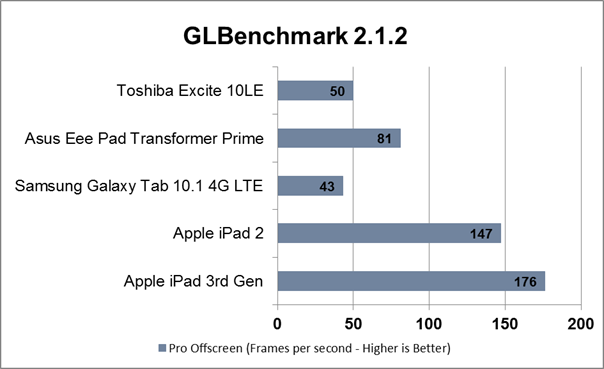
Inside the iPad, Apple has applied moderate improvements to the tablet's guts. The new slate runs on an A5X dual-core Cortex A9-based system-on-chip, but it now has a quad-core graphics engine. That translates into what appears to be reasonably powerful graphics muscle, and solid overall performance. In the benchmark tests we ran at launch, the iPad excelled at some metrics, as you can see in the GLBenchmark 2.1.2 charts below.


On other metrics, including two other GLBenchmark tests and our Web-page-load and Sunspider tests, the iPad matched the iPad 2's performance.

[See "New iPad vs. Android Tablets: Is It Game Over?" for more in-depth analysis of how the new iPad stacks up to the top Android tablets.]

Ultimately, how good the iPad looks and performs will depend largely on the content you're viewing. Most things you view on the new iPad will look better than they do on the iPad 2. Books, magazines, apps, and Web pages all have the potential to look great, like nothing you've seen before, and games will be able to advance in graphical complexity beyond what we have today. It will take time, however, for developers to catch up and make that wholesale shift. Until then, be prepared: Your results will vary dramatically, ranging from disappointing to brilliant.

While this iPad lacks Siri support--an odd omission, given that last fall's iPhone 4S introduced Siri--it does add integrated voice recognition. I really liked using the built-in speech recognition tool, powered by Nuance. That said, I didn't like that I needed to be connected online, since, like Siri on the iPhone 4S, it makes calls back to the Apple servers to provide the service. But it was very accurate and responsive when I tested it. I also wish that the device had a way to perma-hold the microphone button on the keyboard (I didn't stumble across it, if one exists) so that I can dictate more than just a quick sentence here and there. I suppose, however, if that were the intent of the voice feature, I'd be using a dedicated app for that.

The Big iPad Stumble

For all of my raving about the display, I have to note that Apple broke with tradition and didn't make this iPad thinner and lighter than its predecessor. The new iPad is slightly thicker (0.37 inch) than the iPad 2 (0.34 inch), the Samsung Galaxy Tab 10.1 (0.34 inch), and the Asus Eee Pad Transformer Prime (0.33 inch). The Toshiba Excite 10 LE, which currently holds the crown as the slimmest tablet available, measures just 0.3 inch.

While I understand that the increased girth is to accommodate the new iPad's bigger battery, its 4G radio (on those models), and the Retina display, I'm more concerned about the iPad's weight. I surveyed more than a dozen editors in our offices, and all immediately noticed a difference between the new iPad and its competitors, including the iPad 2 and the lightest of the 10-inch-class Androids, the 1.12-pound Toshiba Excite 10 LE, plus the sleek 1.29-pound Asus Eee Pad Transformer Prime.

The third-generation iPad weighs 1.44 pounds for the Wi-Fi-only version and 1.46 pounds for the 4G version. It's a slight but noticeable increase from the iPad 2's weight of 1.33 pounds for the non-3G version and 1.35 pounds for the 3G version. Heavier is not the right direction for tablets to take, and it goes against the trend among competing Android models, which are becoming lighter.

The difference in weight is palpable, and it may become an issue as you use your iPad to show off content, using your dominant hand to navigate, and your weaker hand to support the device. It's also a shame, because this iPad makes reading on an LCD more viable than ever, yet the added weight will deter many people from engaging in long reading sessions. One colleague likened the weight difference between the Toshiba Excite 10 LE and the iPad to the difference between an empty cafeteria tray and another tray laden with a plate of food.

Bottom Line

Although the extra weight is a disappointment, in the scheme of things it doesn't hurt the new iPad's ascent to the throne. Apple remains firmly ahead in terms of an app ecosystem, with more than 200,000 apps deemed "iPad" apps. The new, high-resolution display will pose some challenges to the iOS developer community, but I have no doubt that the community will rise to the occasion quickly, thanks to Apple's insular product strategy.

If you're in the market for a tablet--and if you don't mind the tethers that iOS and Apple impose (devotion to iTunes, the inability to drag and drop files onto the tablet, the lack of file-level control)--then the new iPad is the clear winner. The third-gen Apple iPad redefines the tablet market, and raises the bar impossibly high for the competition.

Hands On With the Toshiba Excite 7.7 Android 4.0 Tablet


Long before the Toshiba Excite 7.7 got its name, its prospects were cause for excitement. The tablet's beefy Nvidia Tegra 3-powered specs, its slim and lightweight design, its Android 4.02 Ice Cream Sandwich operating system, and its high-resolution AMOLED display all made it a front-runner challenger on paper.
Now that it's here, I can report that this model fully lives up to its potential. The only disappointment lies with its steep price: $500 for the 16GB version--the same as the larger-screen third-generation iPad costs--and $580 for the 32GB model.


Next to the iPad's pricing, the Toshiba Excite 7.7 (previously seen at Mobile World Congress as the Toshiba AT270) feels astronomically expensive. That said, it comes in priced just 11 percent higher than the next closest competitor, the Verizon Samsung Galaxy Tab 7.7, which is $450 with a two-year contract. Granted, the Verizon model handles 4G LTE wireless communications, but that tablet is also stuck on last year's Android 3.x Honeycomb operating system. And its dual-core CPU performance is notably slower than that of the Tegra 3-based Excite 7.7.

At least the design of the Excite 7.7 matches its premium price. Aesthetically, it pleases the eye, and it's in keeping with the design of the 10.1-inch and 13.0-inch models in the Excite lineup, sporting a bronze-colored, textured aluminum back with matching plastic edges and well-defined buttons for the volume rocker, power, and rotation-lock slider.

The design is deceptive: Though the Excite 7.7 lacks the contour of the Samsung Galaxy Tab 7.7, the two models are of identical depth, 0.31 inch. The Excite 7.7 is slightly larger than the Tab, standing 8.1 inches tall to the Tab's 7.7 inches; and at 12.3 ounces (or 0.77 pound), it's a bit heavier than the Tab, by 3.2 ounces (or 0.2 pound). Interestingly, the Toshiba tablet feels lighter in the hand, probably due to the balance of the components inside.

The weight of the Excite 7.7 is actually one of the more enticing features, as it indicates that LCD-based tablets are starting to approach a weight that's conducive for one-handed operation. The Excite 7.7 is not as featherlight as current E Ink-based e-readers are (some e-readers are half the Excite's weight), but it is notably light when held one-handed--a critical distinction, and advantage, for a smaller tablet like this. After all, many users like to hold their slate one-handed when they're reading, and the Excite 7.7's high-resolution display makes it ideal for that activity.

High-Res Display

The high-resolution AMOLED display is another major cause for excitement here. Android tablets have been painfully slow to get on the bandwagon of higher-pixel-density displays, and this model is one of the few to do so. At 1280 by 800 pixels, the display has 196 pixels per inch, not as dense as what the current 9.7-inch iPad has, but far better than what the 1024-by-600 Samsung Galaxy Tab 2 7.0 delivers. In my hands-on trials, text looked lovely in ebooks and Web pages, smooth and solidly rendered--and a welcome contrast to the pixelation I've seen on the lower-res competition. The 16:10-aspect-ratio display uses Corning Gorilla Glass and supports ten-finger multitouch, and it was highly responsive when I tried it.

Toshiba says the display is comparable to Samsung's Super AMOLED Plus technology, and I'd have to agree after a side-by-side comparison. Colors looked identical, with similarly high saturation but no oversaturation. The Samsung display was slightly better at handling blacks and whites; Toshiba's screen crushed the blacks and washed out the brightest whites in our grayscale-image test. Beyond that, though, the Toshiba tablet simply excelled at images, producing eye-popping color and reasonably good skin tones. On one of our standard test images, the Excite 7.7 provided one of the better representations we've seen of the skin tones and clothing; it lacked the moiré pattern evident on the Samsung model, though whether this result is due to the difference in operating systems (with the Samsung tablet still on Android 3.x) or something else is unclear. The Excite 7.7 also rendered images sharply, although--as with the other current Android tablets we've seen--images in the Gallery app had fuzzy thumbnails, and needed a moment to render fully when opened.

The last piece of big news about the Excite 7.7 is its Nvidia Tegra 3 processor. Tegra 3 is terrific for gaming; on our GL Benchmark tests, the Excite 7.7 performed in line with other Tegra 3 tablets. Games looked great on the display as well.
 

Additional Features

The Excite 7.7 has a MicroSD card slot (which supports up to MicroSDXC cards) and a Micro-USB On-The-Go port on the bottom, along with a conveniently placed (for landscape use) headphone jack. It also has a 2-megapixel front camera and a 5-megapixel rear-facing camera with flash, plus a proprietary docking connector for charging. The connector is larger and bulkier than most, as on previous Toshiba tablets; however, the unit appeared to charge more quickly in my hands-on tests (formal results and full battery life tests still to come).

Toshiba hasn't customized Android 4.0 much on the Excite 7.7, but the company has preinstalled some handy widget icons on the home screen; these widgets group related apps together for easy access. The company also tosses in a slew of useful apps and a handful of games to get you started.

The Toshiba Excite 7.7's zippy performance, light weight, and terrific display make for great usability. Now, if only the price of admission to this particular tablet ride weren't so high.


Specification Toshiba Excite 7.7 

General 2G Network GSM 850 / 900 / 1800 / 1900
3G Network HSDPA
SIM Mini-SIM
Announced 2012, April
Status Available. Released 2012, July
Body Dimensions 204.5 x 135.2 x 7.8 mm (8.05 x 5.32 x 0.31 in)
Weight 332 g (11.71 oz)
Display Type AMOLED capacitive touchscreen, 16M colors
Size 1280 x 800 pixels, 7.7 inches (~196 ppi pixel density)
Multitouch Yes, up to 10 fingers
Protection Corning Gorilla Glass
Sound Alert types Vibration, MP3 ringtones
Loudspeaker Yes, with stereo speakers
3.5mm jack Yes

- SRS sound enhancement
Memory Card slot microSD, up to 32 GB
Internal 16/32/64 GB storage, 1 GB RAM
Data GPRS Yes
EDGE Yes
Speed HSDPA, HSUPA
WLAN Wi-Fi 802.11 b/g/n, Wi-Fi hotspot
Bluetooth Yes, v3.0
USB Yes, miniUSB v2.0


Camera Primary 5 MP, 2592Ñ…1944 pixels, autofocus, LED flash
Features Geo-tagging
Video Yes, 720p
Secondary Yes, 2 MP
Features OS Android OS, v4.0 (Ice Cream Sandwich)
Chipset Nvidia Tegra 3
CPU Quad-core 1.5 GHz
GPU ULP GeForce 2
Sensors Accelerometer, gyro, compass
Messaging Email, Push Mail, IM, RSS
Browser HTML, Adobe Flash
Radio No
GPS Yes, with A-GPS support
Java Yes, via Java MIDP emulator
Colors Dark gray metallic

- MP3/WAV/WMA/eAAC+ player

- MP4/H.264/H.263/WMV player

- Organizer

- Document viewer

- Photo editor

- Voice memo

- Predictive text input


Battery
Non-removable Li-Po battery (15 Wh)
Stand-by
Talk time

Price $319.99

Sony Xperia Android Tablet S Specs, Price and Review

When Sony first launched its Sony Xperia Tablet S it caused a fair few raised eyebrows. This was because of the wedge-shaped design that made it look very, very different from the competition. The shape (fatter along one long edge than the other) was not just about trying to look different, though. It also meant the Tablet S was different than the norm to hold. For some consumers, it was more ‘booklike’, for others it was just plain awkward.

Sony has stuck with the design idea in the newer Xperia Tablet S, although there is now more metal in the design, which makes for a much more solid feel. The wedgy design means it is heavier at one horizontal end than the other, and when holding it in wide mode that feels a little odd at first.


The 9.4-inch screen is the smallest in our group test, and inevitably that means the hardware is the smallest too. In some respects the screen, with its 1,280 x 800 pixel resolution, is a good compromise between the smaller seven inches that aren’t great for media viewing and the larger 10-1-inches that can sometimes be a bit of a pain to carry. It is certainly sharp enough, and viewing angles are good.

The Tegra 3 quad-core processor is nippy enough, and stereo speakers along the bottom-edge deliver plenty of volume even if the sound is a bit on the tinny side. The fact that Sony has made the Xperia Tablet S splash-proof will no doubt appeal to some people too. Sony has added a variety of apps that bulk out Android 4.0 Ice Cream Sandwich, including a universal remote control, Evernote and something called Free Type Office Suite for document production. Various Sony stores for music, movies and eBooks are here too.

The proprietary charger and data cable slot won’t please everyone, and Sony has found room for an SD card slot so you can use this larger-sized card as well as micro SD with an adapter, but there’s no HDMI here, which is an infuriating omission.

Design
The wedge-like chassis design is unique and makes for an uneven weight distribution but a comfortable hold. Putting the proprietary mains/data cable under a removable cover might be overkill for some, but it helps with Sony’s splash-proof claim.

General performance
The quad-core processor never seemed to be challenged during our testing, and the Sony Xperia Tablet S was responsive under the fingers. Battery life should be enough to get you through a weekend away from home too, which is always a pleasure.

Features
The 9.4-inch screen sits between the usual seven and ten-inch standard and could be the ideal compromise. It makes for smallish hardware yet a screen that’s suitable for video watching or eReading -the Sony Reader store is here for the latter.

Connectivity
Bluetooth and Wi-Fi are both here, but a proprietary data cable is irritating and there’s no USB alternative. Nor is there HDMI which isn’t great. The ability to use it as a TV remote might appeal, though.

All in All
Quirky design and proprietary charge/data cable could be hit and miss. It does run fast, though, and is very portable.

Specification Sony Xperia Android Tablet S
General 2G Network N/A
SIM No
Announced 2012, August
Status Available. Released 2012, September
Body Dimensions 239.8 x 174.4 x 8.8 mm (9.44 x 6.87 x 0.35 in)
Weight 570 g (1.26 lb)
Display Type LED-backlit LCD, capacitive touchscreen, 16M colors
Size 800 x 1280 pixels, 9.4 inches (~161 ppi pixel density)
Multitouch Yes
Protection Oleophobic coating

- Sony Mobile BRAVIA Engine

- IPX-4 certified - splash proof
Sound Alert types N\A
Loudspeaker Yes, with stereo speakers
3.5mm jack Yes
Memory Card slot SD, up to 32 GB
Internal 16/32/64 GB storage, 1 GB RAM
Data GPRS No
EDGE No
WLAN Wi-Fi 802.11 a/b/g/n, dual-band, Wi-Fi hotspot
Bluetooth Yes, v3.0 with A2DP
Infrared port Yes
USB Yes, v2.0
Camera Primary 8 MP, 3264x2448 pixels, autofocus, check quality
Features Geo-tagging, touch focus, face detection
Video Yes, 1080p@30fps, check quality
Secondary Yes, 1 MP, 720p video
Features OS Android OS, v4.0.3 (Ice Cream Sandwich)
Chipset Nvidia Tegra 3
CPU Quad-core 1.3 GHz Cortex-A9
GPU ULP GeForce
Sensors Accelerometer, gyro, compass
Messaging Email, Push Mail, IM, RSS
Browser HTML
Radio No
GPS Yes
Java Yes, via Java MIDP emulator
Colors Black/Silver

- TV-out (via MHL A/V link)

- SNS integration

- MP4/H.264/H.263 player

- MP3/WAV/eAAC+ player

- Organizer

- Document viewer

- Photo viewer/editor

- Voice memo

- Predictive text input
Battery
Non-removable Li-Ion 6000 mAh battery
Stand-by
Talk time Up to 12 h (multimedia)

Tablet Battery life results


Battery life testing is one of the last evaluations we subject tablets to at CNET Labs, but by no means is it the least valued. How long you can use your tablet is nearly as important as what it is you do while using it. 

Our CNET labs testing standards ensure that all tablets, regardless of size, color, or operating system, are tested as close to equally as possible. Details on how we test tablets are included below the testing results chart. We've also thrown in each tablet's maximum luminosity for good measure.

Expect this list to be updated frequently as new tablets are tested.

To see what tablets are coming down the pike, check our current and upcoming tablets list, which gets updated every week.


Tablet name Video battery life 
(in hours)
Maximum brightness 
(in cd/m2)
Resolution Screen size 
(in inches)
Acer Iconia Tab A100 6 227 1,024x600 7
Acer Iconia Tab A200 7.7 318 1,280x800 10
Acer Iconia Tab A500 7.8 377 1,280x800 10.1
Acer Iconia Tab A501 6.4 322 1,280x800 10.1
Acer Iconia Tab A510 11.6 353 1,280x800 10.1
Acer Iconia Tab A700 10 325 1,920x1,200 10.1
Amazon Kindle Fire 6.7* 424 1,024x600 7
Amazon Kindle Fire (2012) 5.4 404 1,024x600 7
Amazon Kindle Fire HD 5.3 394 1,280x800 7
Apple iPad 12.6 388 1,024x768 9.7
Apple iPad 2 14.2 432 1,024x768 9.7
Apple iPad (third generation) 11.4 455 2,048x1,536 9.7
Apple iPad (fourth generation) 13.1 na 2,048x1,536 9.7
Apple iPad Mini 12.1 na 1,024x768 7.9
Archos 70 4.7 302 800x480 7
Archos 80 G9 5.8 220 1,024x768 8
Archos 101 8GB 5.8 177 1,024x600 10.1
Archos 101 G9 5.5 247 1,280x800 10.1
Archos 101 G9 Turbo 5.5 207 1,280x800 10.1
Archos Gen10 101 XS 5.6 210 1,280x800 10.1
Asus Eee Pad Slider 7.7 323 1,280x800 10.1
Asus Eee Pad Transformer 7.3 (10.7 with keyboard) 320 1,280x800 10.1
Asus Eee Pad Transformer Prime 9.6 (15.3 with keyboard) 570 1,280x800 10.1
Asus Transformer Pad TF300 (Balance mode) 8.7 (13 with keyboard) 331 1,280x800 10.1
Asus Transformer Pad Infinity TF700 (Balance mode) 8.5 (13.9 with keyboard) 422 1,920x1,200 10.1
Barnes & Noble Nook Tablet 6.5* 307 1,024x600 7
Barnes & Noble Nook HD 7.3 455 1,440x900 7
Barnes & Noble Nook HD+ 9.5 496 1,920x1,280 9
Google Nexus 7 Wi-Fi: 10.1; 3G: 9 288 1,280x800 7
Google Nexus 10 8.4 368 2,560x1,600 7
HP TouchPad 6.8 292 1,024x768 9.7
HTC Evo View 4G (Sprint) 6.9 454 1,024x600 7
HTC Flyer 6 372 1,024x600 7
HTC Jetstream 7.7 293 1,280x800 10.1
Lenovo IdeaPad A1 4 224 1,024x600 7
Lenovo IdeaPad K1 8.6 289 1,280x800 10.1
Lenovo IdeaTab A2109 9.3 304 1,280x800 9
Lenovo IdeaTab S2109 9.4 411 1,024x768 9.7
Lenovo IdeaTab S2110 10.1 437 1,280x800 9.7
Lenovo ThinkPad 7.6 425 1,280x800 10.1
Motorola Xoom 9.3 312 1,280x800 10.1
Motorola Droid Xyboard 10.1 8.7 411 1,280x800 10.1
Motorola Droid Xyboard 8.2 5.3 469 1,280x800 8.2
Pantech Element 8.8 446 1,024x768 8
RIM BlackBerry PlayBook 7.6 587 1,024x600 7
Samsung Galaxy Note 10.1 9.6 411 1,280x800 10.1
Samsung Galaxy Tab 7.8 364 1,024x600 7
Samsung Galaxy Tab 2 7.0 7.1 379 1,024x600 7
Samsung Galaxy Tab 2 7.0 4G LTE 8.4 454 1,024x600 7
Samsung Galaxy Tab 7.0 Plus 7.8 214 1,024x600 7.2
Samsung Galaxy Tab 7.7 8.8 110 1,280x800 7.7
Samsung Galaxy Tab 8.9 8.2 372 1,280x800 8.9
Samsung Galaxy Tab 10.1 7.5 336 1,280x800 10.1
Samsung Galaxy Tab 2 10.1 6.2 380 1,280x800 10.1
Samsung Galaxy Tab 10.1 4G (Verizon) 8.4 455 1,280x800 10.1
Sony Tablet P 5.9 388 1,024x480 5.5
Sony Tablet S 6.2 393 1,280x800 9.4
Sony Xperia Tablet S 10.5 335 1,280x800 9.4
T-Mobile G-Slate 9.7 424 1,280x768 8.9
T-Mobile SpringBoard 7.3 353 1,280x800 7
Toshiba Excite 7.7 7.5 NA 1,280x800 7.7
Toshiba Excite 10 7.8 358 1,280x800 10
Toshiba Excite 10 LE 8 359 1,280x800 10.1
Toshiba Excite 13 8.8 236 1,600x900 13.3
Toshiba Thrive 10-inch 9.6 337 1,280x800 10.1

How we test tablets

We currently run two different tests to evaluate the performance of non-Windows tablets.

Battery life

We evaluate battery life by continually running a movie file on the tablet until its battery dies.

We set each tablet to Airplane mode and adjust its respective brightnesses to 150 candelas per square meter (cd/M2) or as close to that number as possible.

For the iPad, we run the iPad version of "Toy Story 3." On Android tablets, we run a 720p version of "Toy Story 3." The reason we chose 720p for Android was that not every tablet can run 1080p video just yet, and we wanted to make sure we tested Android tablets under the same methodology.

On the iPads, we ran the movie through the iPod app; for Android, we used the movie player apps mVideoPlayer or DicePlayer, as they provide a much-needed repeat video function that not all native Android movie players include.

*The times for the Amazon Kindle Fire and the Barnes and Noble Nook Tablet reflect continually streaming video through a wireless connection. The router was approximately five feet away with a full signal. We used Amazon Prime to stream "Amadeus" on the Amazon Kindle Fire; for the Barnes and Noble Nook Tablet we used the Netflix application to stream "Amadeus". On both tablets when the movie ended it was manually repeated due to a lack of repeat video function available.

Contrast ratio and brightness
We also tested the maximum brightness, default brightness, and contrast ratio for each tablet. We conducted these tests using the Minolta CA-210 display color analyzer. With each screen at full luminosity, we placed the sensor in the middle of the screen. We used a completely white screen to test the brightness and a completely black screen to test the black level. We then divided the maximum brightness by the maximum black level to get the contrast ratio.

You might also like:

Related Posts Plugin for WordPress, Blogger...

Infolinks In Text Ads