Chitika

Friday, April 5, 2013

Sony Xperia Z review


Sony's mantle as one of the major smartphone manufacturers has slipped a little in recent years, but it still produces some outstanding handsets. The Xperia Z is just such a creature, with a powerful quad-core processor, 13-megapixel camera, 4G and a feast of extras.

It's on sale now for around £450.

The price puts it in the high-end category, but the spec more than justifies it. This is a handset for high-flyers and phone fans who like to be ahead of the curve and are prepared to pay for it.

Design
The Xperia Z is not what you'd call a 'convenient' handset though, with a five-inch screen it's a big ol' handful measuring 139x71x8mm. With shatter-proof glass both back and front it's no lightweight either, tipping the scales at 146g. Around the sides is a single large power/sleep button, a wafer-thin volume rocker and dock connectors. Everything else is hidden behind sealed plastic grommets, including microSD and SIM card slots, microUSB port and 3.5mm headphone jack.

The Xperia Z also makes a virtue of being a tough cookie; it's a rugged phone in a smoothie body. It might be covered in glass, but it's scratch resistant and shatterproof, as well as being water resistant (much like the Xperia Tablet Z). We were able to douse it under the tap and leave it in a filled sink for a couple of minutes with no apparent ill effects -- so it should be able to cope with the general perils of the urban jungle. Sony makes no promises for deserts or mountains but for most day-to-day attacks it should be fine.

Features
That "Reality Screen" is rather lovely though. With a pixel resolution of 1,920x1,080 that boils down to 441 pixels-per-inch (way ahead of the iPhone 5's 326, for instance) and 16 million colours it looks stunning, and it's beautifully sensitive too, responding instantly and accurately to every brush and press -- something you can't always say even for high-end handsets. It has the latest Sony Mobile Bravia Engine to help smooth out video play and we certainly couldn't detect any awkwardness in any of the movies we played.

For such a forward-thinking handset it's a surprise to see the 4.1 version of Android Jelly Bean rather than the very latest 4.2, for which we'll have to wait a little longer. It's not a disaster by any means -- you still get the intuitive Google Now service that punts info at you based on your location and previous choices without the need to search, but it does take the shine off the newness of it a little.

Sony's put its own skin over the top of Android of course, notably with a lock screen that looks like rippling Venetian blinds when you run your thumb over it, and its own distinctive array of shortcut icons and widgets. The unloved Timescape, which pulled together your social networking updates has been removed entirely though, unable to compete with Google's own alerts bar.

Performance
The Xperia Z has 4G LTE capability though you'll need a contract with EE to take full advantage of it (or hold your breath for other networks getting all their 4G ducks in a row later this year). The 1.5GHz quad-core processor is one of the heftiest beasts we've yet seen on a smartphone, and backed by a full 2GB RAM it's a very powerful engine. Our regular AnTuTu performance benchmark test delivered a score of 18,440 -- that's the highest we've yet seen on a handset, defeating quad-core rivals like the Samsung Galaxy Note 2 (13,619), HTC One X+ (16,157) and Google Nexus 4 (17,903), though the last one at least has the distinction of costing around half as much. In short, this is the fastest smartphone we have ever reviewed.

But whether you're doing 3D gaming, watching a movie or even just listening to music, the Xperia Z does seem to get uncomfortably hot during prolonged use. Battery life isn't great either, and we barely got a full day's steady use out of it with the standard settings. There is however Stamina Mode, which powers down all the phone's functions when the screen goes dim. Good for the battery, but not always so good for communication, though you can customise the settings to leave certain functions on, depending on what you need doing.

Camera quality
Considering the power of the processor, it's a bit of a surprise that the 13.1-megapixel camera takes a good two seconds to start up. Not great for speedy snaps, but once it's up and running, it's a bit of a cracker. As well as Sony's Exmor R sensor, designed to improve the quality of pics taken in low light, features include touch-to-focus, face detection, image stabilisation, high dynamic range (HDR) automation, sweep panorama and GPS geo-tagging. All of that would matter naught if picture quality was sub par, but thankfully, it isn't; picture quality is really very good, even in low light, with sharp edges and realistic colours.

Video quality is up there too, with full HD 1,080p recording at 30fps. Unusually, the HDR setting is also available for video as well as stills, which can add an interesting, other-worldly look to your vids.

NFC and connectivity
Near-field communication (NFC) is on board for wireless payments (when you can find a place that accepts them) and for instant settings changes using Sony Smart Tags, though none seemed to be included in the box. Sony has obviously been thinking about the technology too, and it will work with the latest Sony Bravia TVs -- touch your phone to the TV, and it can be set to mirror what's on the phone wirelessly. If you don't have one of the latest Bravias, your options are more limited, since there's no HDMI port to run HD video direct to your TV.

There's 16GB of memory on board, which offers an adequate bit of room for HD pics and vids, but if you need more, it can carry microSD cards up to 32GB in size.

Conclusion
The Sony Xperia Z is a terrific handset offering (almost) the best of Android plus a terrific screen, very fine camera, super-powerful processor and lots more besides. If you can handle the size and the weight, it's a phone to be proud of, and throws down the gauntlet for the soon-come Samsung Galaxy S4.

Wednesday, April 3, 2013

Logitech Ultrathin Keyboard mini Review

Someone can easily love their Apple iPad mini without being fond of typing with the on-screen keyboard. That's where the Logitech Ultrathin Keyboard mini comes in -- it adds a physical keyboard to this tablet without adding a lot of bulk.

I have the full-size version for my iPad and I have always been pleased with it, so I expected big things of the mini version. For the most part it lives up to my expectations.

Build and Design
Logitech Ultrathin Keyboard miniLogitech has created a great looking item here. It's very professional, and definitely a good match for the iPad mini.

The size of Apple's tablet sets the constraints for this keyboard -- you don't want to carry around an accessory that's wider than the computer it's meant to be used with.

The iPad mini is, obviously, small so this add-on has to be as well. This means that there isn't room for a full-sized set of keys like you'd have for a PC, or even a laptop. It's about 80% of the size of a typical keyboard.

This might cause issues for those who have big hands, as they're going to find this keyboard a bit cramped. But I could say the same thing about the iPad mini itself -- if you have hands that are well above average in size, perhaps the full-size version of Apple's tablet might be better for you.

To save even more space, Logitech combined the function of some keys. The only one of these I found even mildly vexing is that TAB is Fn-Q.

But not every corner was cut, not by a long shot. There's a full row of dedicated number keys, as well as a set of directional keys. Punctuation keys are arranged just as they are in a full-size keyboard, so you won't be hunting for the Question Mark.

This accessory has "Ultrathin" in its name for a reason: it really is slender. It isn't going to add a lot of bulk to your tablet when you're carrying it around.

Logitech Ultrathin Keyboard miniTo further save on bulk, it connects to the iPad mini with magnets. You just put the tablet on the keyboard and they will hold themselves together. There is a small hinge along one side for a bit of extra stability.

The downside of this is that this gadget is not designed to protect the tablet. It offers some protection for the screen from scratches when the two are being carried around, but does nothing for the back, nor would it be any help if the tablet is dropped.

More magnets alert the tablet when the keyboard is locked on. Attaching the keyboard puts the iPad to sleep, while removing the keyboard wakes it up.

When in use, the iPad mini fits into a slot that runs just above the top row of keys. It's held in with even more magnets so it's not going to fall out. But keep in mind, it offers only one viewing angle. It's a fine angle, but there's no way to adjust it besides tilting up the entire keyboard.

Performance
The iPad mini's on-screen keyboard is fine for short messages, but a physical one is so much better when doing serious writing. The fact that the screen has no "give" is hard on the fingertips after a while.
Logitech Ultrathin Keyboard mini
The keys on the Ultrathin Keyboard mini, on the other hand, offer a decent amount of travel, making lengthy typing much more comfortable.

I also find it much faster. I've never met anyone who can successfully touchtype on a virtual keyboard, but it is possible with this accessory. It's a bit cramped, but it's doable.

Another thing that's fast and easy is setting this accessory up. It communicates with the tablet over the short-range wireless standard Bluetooth, and Apple's iOS offers built-in support for external Bluetooth keyboards, so no software has to be added to the tablet. All that's necessary is to pair the two devices, a process that takes about 15 seconds total.

The battery life on the Ultrathin Keyboard mini is more than generous. I've had it for a week and, even with extensive use, is still on its first charge with no signs that it's running out.

This isn't surprising -- the full size version can go months on a single charge. I expect its little brother will as well.

Conclusion
The Ultrathin Keyboard mini is a handy bit of kit for those who want to turn their tablet into a miniature laptop. Its keyboard is quite good, even for extended use. Far better than typing on a screen.

At $80 it's not cheap, but it's probably worth it for those who want to make their iPad mini much more productive.

Samsung Galaxy S4 price revealed to be 690 Euros in Portugal


samsung-galaxy-s4-story-album-02.jpg
 
Samsung Galaxy S4 is expected to start retailing in select markets from April 26. After the price in US and UK for the much-awaited smartphone were revealed, there's confirmation of the price elsewhere in Europe.According to PhoneArena, in Portugal the 16GB version of Samsung Galaxy S4 will cost 689.99 Euros, or roughly Rs. 48,100. This price has been indicated by Portuguese arm of smartphone retailer Expansys, which is taking pre-orders for both black and white variants of Samsung Galaxy S4.

As per earlier reports, AT&T will start taking pre-orders for the Samsung Galaxy S4 from April 16 for $250. The amount is $50 above the usual introductory price for high-end smartphones, including Apple's iPhone 5. There were unofficial reports that the unlocked Samsung Galaxy S4 will be available for approximately $579, but based on the US contract pricing and the unlocked pricing in other countries, the actual price should be much higher.

While in UK the customers will have to shell 41 Pounds a month to get their hands on the Samsung Galaxy S4 as per the listing by Phones4U. There are no upfront charges to be paid if a customer opts for this plan. It is expected that the 4G plans for Samsung Galaxy S4 are even more expensive as customers are required to pay a one time fee of 270 UK pounds in addition to the monthly fee of 31 Pounds.

As per the pre-order listing by Amazon the UK customers will have to shell out 699 Pounds for the 16GB version of the Samsung Galaxy S4.

There was another report on the European pricing for the Samsung Galaxy S4. Amazon DE has been taking pre-orders for the much awaited smartphone for 650 Euros.

So far, there is no word in regards to India availability or what could be the tentative price for this smartphone, but based on the pricing in other regions, customers should be prepared for pricing around the Rs. 50,000 mark.

Just to recap, Samsung Galaxy S4 sports a 5-inch full-HD screen with a resolution of 1080x1920 pixels, and pixel density of 441ppi. It is powered by 1.6GHz Exynos octa-core processor in some regions, and a 1.9GHz Qualcomm Snapdragon quad-core processor in others. It has 2GB of RAM and a PowerVR SGX544MP3 triple-core GPU.

The smartphone will come in 16GB, 32GB and 64GB variants but will also feature a microSD card slot for expanding the memory. The Galaxy S4 sports a 13-megapixels rear shooter and a 2-megapixel one on the front. The Galaxy S4 also offers more camera features including dual-shot, employing the use of both front and back camera, an eraser shot mode to remove people from photos, and a Cinemagram like feature called Cinema Photo, among several other tricks.

Samsung is also rumoured to be working on the Samsung Galaxy S4 mini, which is expected to be launched this week. As per leaks, Samsung Galaxy S4 mini will sport a 4.3-inch qHD Super AMOLED display with 256ppi. The smartphone will allegedly come with 1.6GHz dual-core processor. It is expected to run on Android 4.2.2 (Jelly Bean) along with TouchWiz Nature UX 2.0. News reports also suggest that Samsung will be launching Galaxy S4 mini in both single-SIM and dual-SIM variants.

7 best smartphones to consider now

If you're ready to drop some money on one of the latest and greatest smartphones, you have some great choices — too many, in fact.

Turbocharged quad-core processors and wireless charging have nearly become standard on top-of-the-line Android phones. As always, the latest iPhone and its gorgeous screen and vast ecosystem of content is worth your consideration. For those looking to break free of iOS or Android altogether, the underrated Windows Phone 8 awaits.

How can you possibly decide? I've rounded up the 7 best smartphones available and I'll tell you what makes them good.

HTC One
Honed from a slab of aluminum, this 4G LTE flagship from HTC wows on looks and specs. It features a high-resolution 4.7-inch screen, 32 or 64 GB of storage, and is powered by a quad-core processor.


htc-soft2

HTC also worked hard on customizing the latest version of the Android operating system, Jelly Bean. The BlinkFeed feature gives you a live-updated home screen similar to Windows Phone 8. You pick the social networks and news feeds you want to stay tuned into.

While other phone makers race to up camera megapixel counts, HTC went in the other direction with the One's UltraPixel Camera. It has fewer megapixels, but a bigger sensor than other smartphones. If you love to shoot in low light or at night, you should give the One a serious look.

Cost: Not known yet. Available in April at AT&T, T-Mobile and Sprint.

iPhone 5
Apple's flagship smartphone — introduced last September — has a 4-inch Retina screen and the ability to connect to 4G LTE networks from Verizon, AT&T and Sprint.
 
 
Because of the new Lightning dock connector and dual-core A6 processor, the iPhone 5 is notably slimmer than the 4S and twice as fast.

The rear camera's sensor matches the 4S in size, 8 megapixels, but captures much better pictures in low-light situations.

For many users, the iPhone 5's best feature will be access to the App Store, which is rapidly approaching the milestone of 1 million apps. 

Cost: $199 (16GB); $299 (32GB); $399 (64GB) with 2-year contract at AT&T, Sprint and Verizon. $100 down (16GB), plus $20 per month for 24 months at T-Mobile.

Apple also sells an unlocked, contract-free iPhone 5 starting at $649. It only works on GSM networks, such as AT&T and T-Mobile in the U.S.

HTC 8X
Want something different than iOS or Android? The Windows Phone 8 operating system is a good place to look. Its unique "live tile" home screen is a definite winner.


If you want to try it out, the HTC 8X with 4.3-inch display is an excellent choice.

This sleek and compact phone boasts a speedy dual-core processor and 1GB RAM on the inside, which is a big improvement over past Windows Phone units. Plus, it's 4G LTE-capable.

The Windows Phone 8 operating system has far fewer apps available for it, compared to iOS and Android, but you'll stay productive with mobile versions of Excel, Word, OneNote and PowerPoint. The built-in People Hub keeps all your social media feeds organized in handy place.

Non-expandable storage maxes out at 16GB, but that can be extended with Microsoft's SkyDrive cloud storage service.

Cost: $100 (16GB), with a 2-year Verizon or AT&T contract. $0 down, plus $18 per month for 24 months at T-Mobile.

Although thicker and heavier, the Nokia Lumia 920 ($100, AT&T) is another great option for Windows Phone fans.

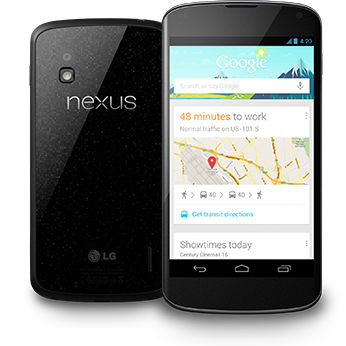
Nexus 4
Launched last November, this popular unlocked phone from Google and LG has a 4.7-inch display. How popular is it? It's often back-ordered 1 to 2 weeks!

https://lh6.ggpht.com/TWF21RygkFpkU-vKhdAxub1mF6L9xxoqc7aD1F6tD8ElCQFES4Ljn3yuUqcM1iZxC5A=w346
The wait is worth it, though.

The combination of quad-core processor and stock Android Jelly Bean — unencumbered with carrier "extras" — make the Nexus 4 a very snappy smartphone.

Although it's limited to HSPA+ "4G" connectivity, that's fast enough for an average user. Note that it will only work on GSM networks like AT&T and T-Mobile.

The previous version of the Nexus had a so-so 5MP camera. The 4's 8MP camera is a lot better and more fun, especially when taking panoramas. Both vertical and horizontal images can be stitched into stunning Photo Sphere pictures.

Cost, unlocked from Google: $299 (8GB); $349 (16GB). $50 down (16GB), plus $17 per month for 24 months at T-Mobile.

Samsung Galaxy Note II
There were a few jeers when Samsung unveiled the Galaxy Note II, a "phablet" (phone + tablet) with a gigantic 5.5-inch screen that includes an advanced S Pen stylus. Despite that, it has become a top choice of many mobile business users who need 4G connectivity and like to quickly jot down notes, make annotations and run two apps side by side.


The Galaxy Note II features a quad-core processor and runs on Android Jelly Bean. You can expand the 16GB or 32GB of internal storage up to an additional 64GB using a microSD card.

Cost: $300 (16GB) with 2-year contract from Sprint, Verizon and AT&T. $200 down, plus $20 per month for 24 months at T-Mobile.

Samsung Galaxy S4
The Samsung Galaxy is the phone line that grabbed attention away from the iPhone and shifted it toward Android.
samsung-galaxy-s4-story-album-02.jpg


The 4G LTE Galaxy S4 is the best version yet. With its polycarbonate shell available in white or gray, it looks a lot like the S III, but the S4 is lighter and thinner and features an expanded 5-inch HD screen, 13 MP rear camera and faster quad-core processor.

Samsung integrated a ton of useful, customized software features into the 4.2.2 Android Jelly Bean operating system. S Translator allows you to converse in 10 different languages while using email or the ChatOn instant messaging app. With S Health, fitness buffs can turn the phone into a pedometer and calorie-counter. In the car, control the phone hands-free with S Voice Drive.

Infrared technology allows users to tilt the phone up or down to scroll. You can also use your finger like an S Pen, but there's no need to actually touch the screen - just hover slightly above it. A video will pause if you look away from the screen and resume when you look back. The IR capability, by the way, also puts the S4 to work as TV remote.

Choose storage of 16, 32 or 64 GB, which can be expanded with up to a 64 GB microSD card.
Cost: Not known yet. Available in late April at AT&T, Verizon, Sprint and T-Mobile.

LG Optimus G
LG proved it can still make a splash in the smartphone world with the Optimus G, a close cousin of the Nexus 4.

http://forum.xda-developers.com/deviceForum/screenshots/1921/20121116T011729.jpg

Sprint's version features a powerful 13MP camera, although AT&T's model is no slouch at 8MP. Sprint's model has 32 GB of non-expandable storage, while AT&T's 16GB Optimus can be expanded via microSD card.

Either way, you'll get a blazing fast quad-core processor, 2GB of RAM and a nice 4.7-inch display.

Right now, the Optimus G is stuck on Android Ice Cream Sandwich, but it should get an update to the newer Jelly Bean soon.

Cost: $50 ($32GB) with a 2-year Sprint contract, new line only; $100 (16GB) with a 2-year AT&T contract.

Razer Edge Pro Gaming Tablet Review

Review

Razer Edge Pro Gaming Tablet Review 
Like many PC gamers, I've often wished a machine capable of putting the power of a gaming rig in a portable device. Gaming laptops are lovely and have their place, but that place is often on top of a desk. After a week with Razer's new Edge gaming tablet, I realize what I really wanted was to play Bioshock Infinite in the bathroom without burning my thighs. All hail Razer, deliverer of dreams.

Razer's only review guidelines before sending along a Razer Edge loaner was that I not tell them I used it in the bathroom. I am a review guideline freedom fighter, deep in the trenches, pants around my ankles, balancing a $1,499 gaming tablet on the side of the tub before redeploying to less secluded front. And why not? I don't have to stop playing until the batteries run out.

Razer first introduced the Edge in early 2012 as an odd-looking tablet/controller hybrid with handles on either side containing buttons and analog sticks. It looked pretty ridiculous, but there was promise there. Promise I was pretty sure would never be fulfilled — a pipe dream.

Yet Razer stuck with it, tapping the PC gamers in its community to help design a gaming tablet that delivered everything they wanted at a reasonable price point. A year after it debuted, the design was finalized. The Razer Edge was a real thing, and it was coming soon.

There are two models of the Razer Edge. The lower-end model runs $999 and sounds like a capable system. It's got an Intel Core i5 instead of an i7, less memory and only 64GB of storage, but I can see it getting the job done, as long as you don't want to load too many games on it at once.

The unit I've been playing on is the beefier, $1449 Razer Edge Pro. Here's what's inside:
Intel Core i7 Dual core w/ Hyper Threading
Base 1.9GHz / Turbo 3.0GHz
8GB DDR3 (2x4GB 1600MHz)
Intel HD4000 (DX11)
NVIDIA GT 640M LE (2GB DDR3, Optimus Technology)
10.1” (IPS, 1366x768)
Multi-touch HD display
Windows 8
128/256GB SSD (SATA-III)
Intel WLAN (802.11b/g/n + BT4)
Stereo speakers
Codec supports 7.1 (via HDMI through optional Docking Station)
HD Webcam (front-facing, 2MP)
Array microphones
Dolby Home Theater v4
USB 3.0 x1 (green, SuperSpeed)
Audio jack (3.5mm, 4-pole, stereo out / mic in)
Approximate Size: 278.5 mm x 178.85 mm x 19.5 mm / 10.9" x 7" x .80"
Approximate Weight: 962g / 2.1Lbs

Design

It's a tablet!

t's a rectangle, as one might have expected. The design is reminecent of the Razer Blade laptop, using the same ridged metal for the back and that damn glowing octopus thing. It's about as thick as a closed Nintendo 3DS XL, and about as big as it looks in this size comparison image I made using everyday household items (in my household, that is).


It's beefier than your average tablet, but it's nice to have something to hold. It feels quite solid, and at a little over two pounds it has heft without being too much of a burden for hands used to resting comfortably on gaming mice. The Display

The 10.1 inch IPS display is as bright and crisp as a sunny day. Just don't take it outside on a sunny day, or you won't be able to see a thing. This is not a device to bring to a picnic, unless it's the most depressing picnic ever. The Razer Edge Pro has made me appreciate my back deck as a place where I'm not meant to play the new Devil May Cry.

The screen resolution is 1366x768, which might seem low to someone used to nothing less than a 1920x1080 HD monitor, but then you don't hold a 1920x1080 HD monitor inches from your face. At least you're not supposed to. It's a good resolution for the screen size, and it means the unit's graphics card doesn't have to work quite as hard.

Performance

Thanks to the glory of AT&T internet in a new apartment, downloading my normal suite of benchmarking games was out of the question, especially since I wasted a good several hours downloading Transformers: Fall of Cybertron because I was in a Transformers sort of mood. Were I to do this all over again I'd purchase a USB wired network adapter for loading purposes. The Edge's wireless isn't slow, but nothing beats a wire.

What I used for benchmarks instead were a pair of new games, Bioshock Infinite and the latest Tomb Raider, both of which were considerate enough to include built-in benchmarks.

Out of habit I tried both games at the highest possible graphics preset first. Ultra setting was not kind to either game — not that I expected it to be. Still, 17 frames per second on average for both titles is playable, just not very playable.

Cranking things down (you can totally crank downwards) to medium settings brought both titles to a lovely average of 56- 60 frames per second (I even remembered to turn off vertical sync). Not only is that playable, it's downright enjoyable, at least while it lasts.

Battery Life and Configurations

The Razer Edge uses low-powered Intel graphics to handle every day Windows 8 tablet tasks, and I'd assume the battery life for those is just fine, but there are dozens of less-expensive tablets out there if you just want to run Microsoft Word. This is about gaming.


In full-on battle mode with its optional Gamepad Controller ($249.99) loaded with an extra battery ($69.99), the Razer Edge Pro ran Bioshock Infinite for one hour and forty-five minutes.

That's not a lot of minutes, all things considered, but then you probably won't want to be using the Gamepad Controller for that long anyway. With the extra battery it adds what feels like another two pounds to the unit, and holding upwards for extended periods hurts. It works like gangbusters (though mine seems to have bugged out towards the end of my testing — Razer thinks it's faulty), and after a brief adjustment period (the screen, it moves with my hands!) it's a fun way to play. Just not a way you'd want to play for an extended period of time.

I much preferred playing on the standard docking station ($99.99) with an Xbox controller plugged in, as you can see below.


The biggest obstacle the Razer Edge faces is its own innovation. It's not just the most powerful Windows 8 tablet on the market — it's a revolutionary new way to play PC games. It's the revolutionary part I'm struggling with. I've been play PC games sitting in a chair with one hand on my keyboard and the other on my mouse for nearly two decades, so curling up on the couch with a handheld might be a little more intimacy than I'm prepared for.

Still, it's growing on me, and it's not like I can break up with it now that we've been in the bathroom together.

Best Android tablets (April 2013 edition)


Samsung Galaxy Note 10.1

The Galaxy Note 10.1 is Samsung's is a flagship tablet that commands a flagship price.

The hardware is all top-notch, with a 10.1-inch screen with a 1280x800 resolution display, a 1.4GHz Exynos quad core processor, a choice of 16GB, 32GB or 64GB of storage, a 5 megapixel rear-facing camera, a 1.9 megapixel front-facing camera, and a 10-hour battery pack.

The software is Android 4.0 "Ice Cream Sandwich" but there's an upgrade path to Android 4.1 "Jelly Bean".
For times when a finger just isn't precise enough, the Samsung Galaxy Note 10.1 comes with a nifty stylus called the S Pen specifically designed to work with a number of applications. This really comes to its own when doing fiddly things like working in a spreadsheet, or knocking out a doodle.

The stylus makes the Galaxy Note 10.1 a great machine for taking notes, planning, and sketching out ideas.
At a glance:
  • 10.1-inch, 1280x800 display
  • 1.4GHz Exynos quad core processor
  • Android 4.0 "Ice Cream Sandwich"
  • 5 megapixel rear-facing camera, a 1.9 megapixel front-facing camera
  • Choice of 16GB, 32GB or 64GB
  • Battery life of 10 hours
Price:from $499.
Link/image source:Samsung.

Monday, April 1, 2013

Amazon Kindle Fire HD 8.9 review:

The best Kindle Fire yet 

The good: The Kindle Fire HD 8.9 has zippier navigation than its 7-inch counterpart, a beautiful high-definition screen, incredibly fast 4G LTE speeds, seamless streaming performance, and access to one of the best media eco systems available. The new Fire HD interface feels better suited on the 8.9-inch screen.

The bad: Web performance is lacking compared with that of other tablets. Its physical design is fairly plain with buttons that are too flush with its chassis. The curated Appstore means many games and non-entertainment quality apps are not available. There's a $15 opt-out for ads.

The bottom line: If you're looking for a pure media consumption experience, the Kindle Fire HD 8.9 delivers better than any tablet before it. People looking for something more utilitarian, however, will want to look elsewhere.

If you're interested in purchasing a Kindle Fire, know that the Fire HD 8.9 is the version to get. It has a large 1,920x1,200-pixel-resolution screen that facilitates Amazon's current Kindle Fire interface better than the 7-incher. Also, its faster processor makes for a much smoother and zippier experience.

The Fire HD 8.9's unique screen size lands in between the 7.9-inch iPad Mini and the 9.7-inch iPad. While the iPad Mini carries with it the trump card advantage of Apple's ecosystem and industry-leading App Store, the Fire HD 8.9’s lower pricing, superior streaming capability, and higher-resolution screen make it a better deal if you’re looking for a media consumption device. Especially if you’re an Amazon Prime member. The Mini does have speedier performance and as mentioned, many more app options, however.

The fourth-generation iPad is still the ultimate premium tablet. Its performance in just about everything beats all other tablets, and it's the best doorway to the most and highest-quality apps you can find on any mobile device. But, the Fire HD 8.9 has superior video-streaming prowess and is also a lot cheaper than the iPad in both Wi-Fi (starting at $269) and 4G LTE (starting at $399) models.

I should also note that Barnes & Noble offers the 9-inch Nook HD+ for $269 as well, with a slightly higher-resolution screen than the Fire HD's as well as expandable storage. The Nook ecosystem however isn't as mature, nor is its app store as well-stocked as Amazon’s. There’s also no 4G version of the Nook HD+.

The Fire HD 8.9’s $269 entry price is a fantastic deal, as the content and services Amazon provides are well worth the price. It’s not as versatile as the iPad or Nexus 10, but it’s the best version of the Kindle Fire yet and the best media consumption tablet out there.

Design
The Amazon Kindle Fire HD’s (Wi-Fi: $269 for 16GB, $299 for 32GB; 4G: $399 for 32GB, $499 for 64GB) design feels more at home with an 8.9-inch screen, compared to the 7-inch version. As a larger tablet, the Fire HD 8.9 better facilitates the Kindle Fire’s new operating system and its faster processor produces much smoother navigation.


Kindle Fire HD 8.9 Apple iPad (third generation) Google Nexus 10
Weight in pounds 1.25 1.44 1.33
Width in inches (landscape) 6.4 7.3 6.9
Height in inches 9.4 9.5 10.4
Depth in inches 0.35 0.37 0.35
Side bezel width in inches (landscape) 1.0 0.87 0.9

Beveled bottoms are the new hotness -- for tablets, anyway. From the Nexus 7 to the iPad, and Microsoft's Surface tablet, beveled bottoms are to 2012 what legitimately thin form factors were to 2011. Beveled bottoms have the power to make a tablet look thinner than it actually is. The Fire HD 8.9 is actually thinner than the current iPad and matches the Nexus 10’s profile length.

The tablet is dark gray and looks fairly plain, with a tablet-wide black strip on the back as the only real distinguishing aesthetic trait. In the middle of the top portion of the bezel sits a 720p Web chat camera with a nearly invisible ambient light sensor sitting to its left. The bezel itself is surrounded by an outer plastic shell for added protection.


Along the bottom edge directly in the middle are Micro-USB and a Micro-HDMI ports. On the right edge, from top to bottom, are a headphone jack, volume rocker, and the power/sleep button. Both the volume rocker and power/sleep button sit flush with the tablet's body, making them difficult to find without looking. Sitting alone on the top edge is a microphone pinhole.

The back is smooth and not nearly as grippy as the Nexus 10's rubbery back. Dual inch-long speaker grilles adorn the Fire HD 8.9's back at the far left and right sides, continuing to the tablet's right and left edges.


For some strange, ill-conceived reason, Amazon chose not to include an actual power adapter with the Kindle Fire HD 8.9 and instead supplied only a Micro-USB-to-USB cable. While the tablet will charge when connected to a plugged-in computer, it will do so very slowly and only when asleep. Thankfully, if you own the original Fire (or pretty much any Micro-USB-to-power adapter), its charger should be compatible with the Kindle Fire HD 8.9.

Software features: The refining
Since the debut of the original Kindle Fire, Amazon has completely redesigned the interface. The new interface debuted first on the Kindle Fire HD and Kindle Fire (2012) and hasn’t changed at all here. It still feels streamlined and mature, eschewing the toylike quality the original interface had. On the 8.9, images and text are even sharper, thanks its 1,920x1,200-pixel resolution and high contrast. The carousel interface is still here, but scrolls faster and looks smoother, with app icons rendered in sharp, less pixely forms. Apps can be removed from the carousel at will and/or added to favorites, which appear at the bottom of the screen, negating the need to scroll through your entire catalog to find the app you want.


Newsstand, Books, Music, Videos, Docs, Apps, and Web return as top-of-the-screen content tab options and have now been joined by Shop, Games, Audiobooks, Photos, and Offers. Search returns as well and now allows you to search in Amazon's stores in addition to the Web and your own library. 

Settings can be accessed with a quick swipe down from the top bezel and now feature more options for social network integration, more customization, and tighter security. Within each content tab are the very useful cloud and device denotations at the top that help identiify which pieces of content are on the Fire HD or currently in the cloud. 


There are problems, though. As streamlined as the interface is, at times it serves only to illustrate how much better it could be. After entering a content tab, you can't travel directly to another and must instead tap back and choose a new selection. I would have loved to see a more elegant solution that allows carousel options to always be available onscreen.

Software features: The newening
The streamlined interface isn't Amazon's only accomplishment here; it has added several new features to further set the Fire HD 8.9 apart from other tablets.


With X-Ray for Books you can get more information about characters, terms, and historical figures mentioned in a Kindle book, and it also highlights exactly where (via page number and a graph) in the book those details are mentioned and can jump right to the appropriate page. Definitely useful, but the ability to search for specific terms should be at the top of Amazon's to-do list when the time comes to revise this feature.

X-Ray for Movies is frankly a lot less useful, as it's essentially an integrated IMDb feature that provides access to actor bios while you watch the movie. Just tap the screen while watching "The Avengers," for example, and a drop-down menu of the actors who are in the current scene appears. Select whichever actor you're interested in, and as long as that person is actually listed in IMDb, you'll have access to his or her bio. Impressively, this works in real time, adding and removing people from the list as they enter and exit scenes. It's not compatible with all movies yet, and I've yet to see it featured in any of the TV shows I've watched on the device.

Immersion reading uses the audio and Kindle versions of a single book and combines them to create an experience currently not reproducible on any other tablet. As the text is read by the original audiobook reader, each word is highlighted on the Kindle book version, allowing you to follow along bouncing-ball-style (well, sans an actual bouncing ball) with the story. It takes a bit of getting used to, but can be appealing for audiobook fans like myself who love to listen but want to retain the actual experience of reading as well.

In addition, Whispersync for voice allows you to stop reading at any spot in the Kindle version of a book and then continue later at that exact spot in your audiobook and vice versa. 

Now each of these scenarios, however, requires that you'd be willing to purchase both the audiobook and Kindle versions of a book. So, who would actually own both versions of the book? Well, probably people who want to take advantage of these two features. As an incentive, Amazon claims it will offer discounts on audiobook versions of books if you already own the Kindle version; however, this won't extend to every book/audiobook combo.

You can now import your photos from Facebook to your Amazon Cloud Drive and view them (or any photos already in your Cloud Drive) on your Fire HD 8.9. Unfortunately, if importing directly from Facebook, you're not able to specify which photos you want to import and are forced to import them all.

Newsstand includes a slick page-turning animation and the option to tap on an article and read it in simple text. The Kindle Fire's e-mail interface, thankfully, has also been redesigned, now looking less like a '90s message board and more like a modern, legitimate e-mail client. Also, contacts can now be automatically imported by e-mail account instead of by each individual contact, as it was on the original Kindle Fire. A full calendar app with built-in reminders has been added as well.

FreeTime
Amazon’s FreeTime is a downloadable app that allows Fire owners to create new parental controlled profiles. Each new profile can be customized with access to the content of your choosing with access to these parameters only available after supplying a predetermined password. Daily time limits can be set for each profile, either by total use time or by individual types of content: books, videos, and apps.


When activated, FreeTime delivers a limited version of the OS showing only the content already chosen for that profile. The background also turns blue so parents can easily see whether their kid is currently in the mode or has somehow hacked his or her way into the full OS.

FreeTime is a great option for families looking to share their tablet, but I wish it was more seamlessly integrated into the interface. As a separate app it requires that you launch it first and then choose a profile, whereas the Nook HD’s implementation of a similar feature is always accessible from the home screen.


We've got ads!
Much has been made of Amazon's decision to ship all versions of the Kindle Fire HD with ads appearing on the lock screen. You can opt out of these ads by paying an extra $15; they will no longer appear afterward. The ads range from Amazon coupons to movie trailers to books; a new one appears each time you press the power button to wake the tablet. On either side of the screen is an unlock slider button. The right-side slider unlocks the screen normally and the left one unlocks the ad, taking you to the trailer, coupon, and so on. All the ads appear as high-res, high-quality images taking the place of the lock screen background. It's actually the least intrusive ad method I've ever seen, and I appreciate the coupon offers. If I owned a Kindle Fire HD or 8.9, I would personally not opt out. Although I can understand why some people would be bothered by being constantly advertised to on a device they purchased, it's not an issue that should affect your buying decision.

The Prime advantage
In addition to free two-day shipping on select products, Amazon Prime members receive two other benefits that all Fire HD owners can directly take advantage of. Prime owners receive access to Amazon's growing list of streaming movies and TV shows and can borrow a single Kindle book every month with no due date. Prime membership is $79 per year, and each version of the Kindle Fire HD comes with a free month of Prime so you can try out the service. Honestly, if you don't have a Prime membership, the appeal of the Fire HDs are greatly diminished. It would be almost like owning an iPad without an iTunes account.


No quad-core for you!
While it's difficult to find a tablet release without also finding a quad-core processor inside of it, Amazon bucks the trend by embedding Texas Instruments' dual-core 1.5GHz OMAP4470 CPU inside the Fire HD 8.9, with the GPU stylings of the Power VR SGX544 GPU in tow. It also includes 1GB of RAM, 802.11 b/g/n Wi-Fi support, Bluetooth, and a gyroscope.

How much is 4G?
The 4G version of the Fire HD 8.9 is identical to the Wi-Fi-only version, but sports a superfast cellular connection, with a starting cost of $399.


The price has been lowered from the original by $100 and for a line of tablets that has thus far prided itself on low prices is still pretty high, but the actual cellular plan appears cheaper than what's currently available on tablets. For $50, Amazon offers 250MB per month for 12 months. Both 3GB and 5GB monthly plans are also available. For comparison, 4G on the iPad costs $15 per month ($180 per year) for the same amount of data. A proposition that's $130 more expensive than the Fire HD.

Wi-Fi vs. 4G LTE
Amazon touts the Fire HD 8.9's inclusion of dual antennas, MIMO support, and both 2.4GHz and 5GHz band support, but Web page load speeds under Wi-Fi were consistently several seconds behind the fourth-generation iPad running Safari. However, in every instance I tested it, Web page loading speeds over 4G LTE were on average 3 to 4 seconds faster. Also, I found quickly scrolling down Web pages had a hard time keeping up and consistently produced lots of clipping. While navigating through the Fire HD’s OS interface felt much zippier than on the 7-inch version, the Web experience on both tablets felt sluggish in not just load speeds with simply navigating. It sometime took 1 to 2 seconds for the keyboard to appear after tapping the address bar; on other tablets like the iPad or the Nexus 10, this happens instantaneously.

Streaming-video performance was where the Fire HD 8.9's new networking hardware earned its keep. I started streaming "The Avengers" on both the Nexus 10 and Fire HD 8.9, and while neither had any trouble reproducing a crystal-clear 720p image when within close proximity of my test router, things changed as I left the lab and walked several feet away. At about 20 feet away (and with two or three walls in between), the Nexus 10 lost the streaming signal and delivered only a spinning circle for several minutes. It eventually connected to CNET’s internal network and picked up the signal again as I walked down six flights of stairs and switched to a lower-bandwidth SD signal. As I left the building, the Nexus 10 was no longer streaming the movie. The Fire HD 8.9, however, kept streaming its HD signal, even as I left the building; I was a good 50 feet away when I finally got the spinning circle.


Packed with pixels
The 8.9-inch version of the Kindle Fire HD features an in-plane switching (IPS) screen, running at a 1,920x1,200-pixel resolution. Colors pop from the display and have a really vibrant, high-contrast look. There is unfortunately some very visible backlight bleeding at the top when viewing dark screens.

Tested spec Kindle Fire HD 8.9 Apple iPad (third generation) Google Nexus 10
Maximum brightness 413 cd/m2 455 cd/m2 368 cd/m2
Maximum black level 0.45 cd/m2 0.49 cd/m2 0.44 cd/m2
Maximum contrast ratio 917:1 939:1 836:1

Amazon says it combined the touch sensor and LCD into a single layer of glass for the Fire HDs, which purportedly should decrease reflections, but I honestly didn't see a difference between it and other premium tablets in that regard.

Games performance
I used Riptide GP to test relative game performance compared with the current iPad and Nexus 10. Both the Nexus 10 and iPad are able to maintain consistently high frame rates during play, but the Fire 8.9 could not keep up . Frame rates are still playable, just not as silky smooth. However, N.O.V.A. 3 and Need for Speed: Most Wanted each run at consistently smooth clips.


Thankfully, since the release of the 7-inch Fire HD, many "Kindle Fire Edition” games have released into the Amazon Appstore, reducing the need now to sideload apps. Conversely, many useful utilitarian apps available on the iPad are nowhere to be found here.


Speakers
While watching movies, playing games, or listening to music, the Fire HD 8.9's speakers delivered clear, loud (if you need it to be) sound that's noticeably better than what I've heard from other tablets. While the speakers are on the back, thanks to the tablet's beveled bottom, they don't sit flush with the desktop and actually send out sound at an angle that reverberates off the desk, enhancing the quality.

There is a lack of bass, however, and ideally I'd rather listen through earbuds or larger speakers. For tablet speakers, though, there are currently none better.

Battery life
I've had the Kindle Fire HD 8.9's brightness set to about 75 percent during the three days I've had to play with the device, constantly streaming video, downloading apps, playing games, and navigating the interface. During that time, the battery required charging about once every five hours. Look for official battery results soon, after CNET Labs has a chance to run it through its paces.

Conclusion
The Kindle Fire HD 8.9 was made for Amazon’s new Fire interface. Compared with the 7-inch version, navigation is snappier and the higher-resolution screen better displays menu options. Amazon’s content offerings are vast, especially if you’re a Prime member, and its 4G LTE speeds are incredibly fast. Starting at $269, it’s one of the best tablet values available. The Kindle Fire line is still the strongest media consumption tablet line going, and this latest version is the best one yet.

You might also like:

Related Posts Plugin for WordPress, Blogger...

Infolinks In Text Ads